
Take cash or a check
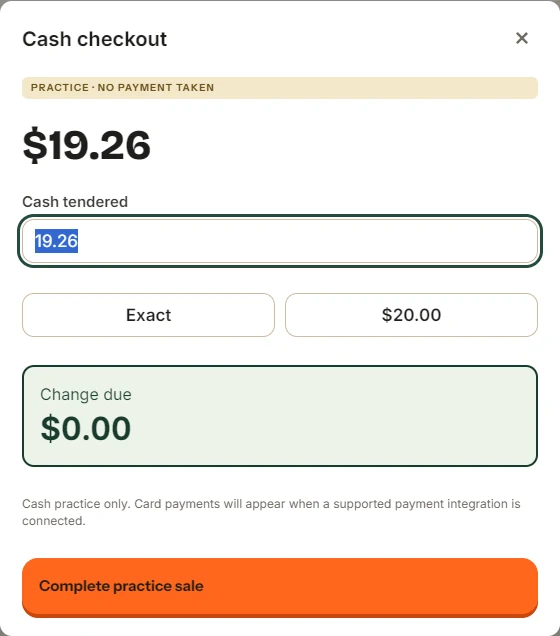
Check the final total, enter what the customer hands you and confirm the payment once.
Take cash
- Check the items, customer and total in the sale panel, then press the checkout button.
- Enter the amount handed over in Cash received ($). Dollar fields fill from the cents side, so 2000 means $20.00.
- Check the displayed change and any approval request.
- Confirm once. Wait for the result before starting another sale.
When the sale finishes, the change window keeps the amount due visible. Return that change and use the receipt action the customer needs. Press Next customer when you are ready.
Take a check
Check payment appears when your store has it switched on. Press Add check in checkout. Enter the check number, the requested name and Check amount ($). Follow the payee shown on screen and your store’s identity-check policy.
Adding a check sets the cash amount to zero. For a check-only payment, leave it at zero and check that the check covers the total. For a split payment, enter the remaining cash received as well. Recheck the change before confirming.
A check is recorded as accepted pending clearing. Acceptance at the counter does not mean the bank has cleared it. If a customer has a returned-check restriction, follow the register’s response and ask a Manager to handle it.
Cash-discount pricing
When your store has cash-discount pricing, the checkout total includes the applicable adjustment and names it. Use the total displayed for that payment. Do not add the same discount again as a counter discount.
If the result does not come back
Keep the sale. An unanswered result does not mean payment failed. Use Check Roadside or Retry saved sale on that saved attempt when available. Do not ring the basket again or take payment a second time.
The offline and recovery chapter explains waiting sales and when to contact support.
Something here does not match your screen? Write to support@dirtroadsoftware.com with the name of the screen, what you pressed and what you expected. A picture of the screen helps.