
Sell an item by weight
For a product priced by weight, the register reads the scale and records that weighing on its own sale line.
In this chapter
Before the first weighing
A product sold by weight has a price per unit, such as a price per pound. Your register’s scale must be configured in Register settings under Scale. Have the store owner or Manager check the setup before using it for a sale.
Tare is the weight of the bag or container removed from the gross weight. The net weight is the product weight the customer pays for. Check the unit on the scale against the unit used to price the item.
Weigh a bag
- Scan or choose the product. The Weigh window opens.
- For a Stable stream (StC) scale, start with the scale empty and reading zero after the window opens. Then place the item on the scale.
- Enter the known packaging weight in Tare if needed, and press Use tare. Use one tare method. If the register cannot read a tare set on the scale, clear it on the scale and enter it in the window.
- Wait for a steady weight. Check the net weight, tare, price per unit and total.
- Press Accept to put the weighed line in the basket.
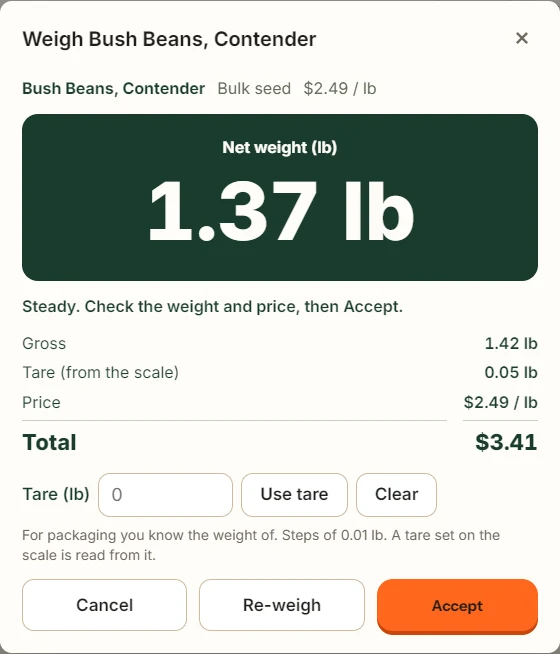
With Stable stream (StC), the accepted steady weight stays available after you lift the bag off. Press Re-weigh if you need a new reading, starting again from an empty scale at zero. Other scale types may take another reading when you press Accept, so leave the item in place until accepted.
Several bags of the same product
Accept the first weighing, then scan or choose the product again for the next bag. Each bag keeps its own line and tare. Remove takes off only that line.
You cannot type over a recorded weight as if it were a counted quantity. Remove an incorrect line and weigh it again.
When the scale refuses a reading
Follow the message for an unsettled weight, overload or wrong unit. If it asks for zero, empty and zero the scale before putting the item back. Do not substitute a typed quantity for a failed weighing. The hardware chapter covers connection checks.
Receipt and connection
The receipt records the product’s net weight, unit price and total, with the tare. Check those lines when reviewing a weighed sale.
Finish weighed-item checkout while connected to Roadside. If the register refuses a weighed line while offline, reconnect before taking payment.
Something here does not match your screen? Write to support@dirtroadsoftware.com with the name of the screen, what you pressed and what you expected. A picture of the screen helps.