Check farm documents before they expire
Find customers whose farm documents have expired or come due in the next 30 days. Give someone the call and check separately whether the store has approved a replacement tax certificate.
Find documents that are expired or due soon
Included on the Whole Store plan.
Open Follow-up and press Review renewal dates. The link appears when Follow-up is set up and the store uses the Feed & Seed pack. Staff, Managers and the Store owner can create follow-ups. Read only can check the dates.
- Renewal follow-up
- A follow-up made from a document expiry date saved on a customer's account.
- Read the date beside Expired or due by. The list covers dates already past and dates through 30 days from today. Check the customer, the date and the kind of document: Ag tax exemption, Veterinary Feed Directive (VFD) or Restricted-use pesticide license. An Expired date has passed. Due soon includes today.
- Check whether someone already has the job. Task open and Task completed both have a View account follow-ups link. For a document without a job, tick the box beside its document and customer. You can select up to 250 records at once.
- Give the selected calls to the team. Creating these follow-ups records work for staff. It does not contact the customer, change their dates or approve a purchase. Press Create selected follow-ups. The message counts the follow-ups created and any that already existed.
- Check the row for Task open. Press View account follow-ups. The title begins with Renew and the due date is the recorded expiry. The job goes to the team member assigned to the account if they can work follow-ups. Otherwise it reads Unassigned.
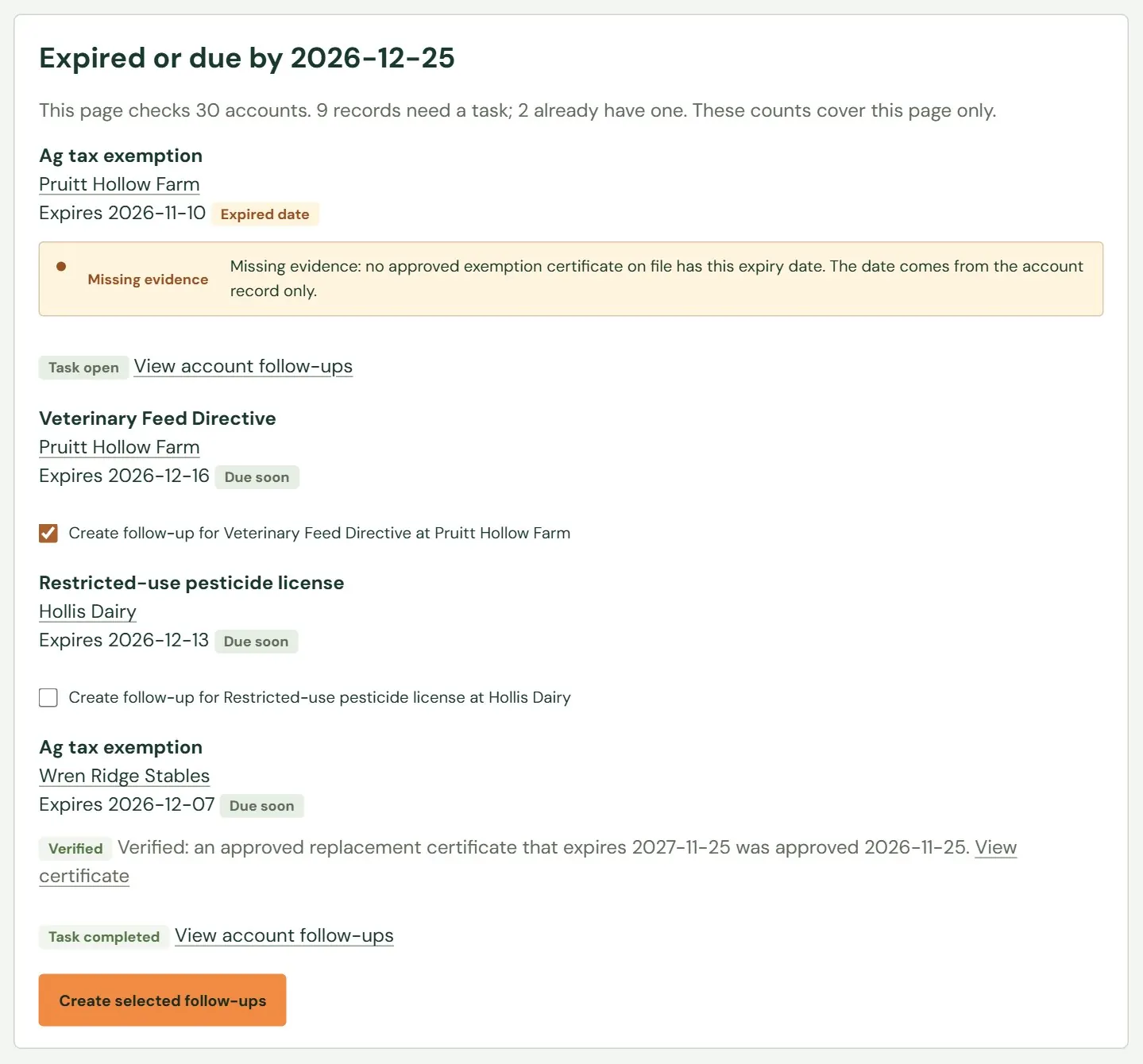
- 1Check which date has already passed.
- 2Read the expiry before deciding whom to call.
- 3Tick the document that needs a follow-up.
- 4Open the account's follow-ups to read the existing job.
- 5Create jobs for the checked records.
The totals cover this page only. If you see No renewal follow-ups found on this page., press Next accounts if offered. If a date was skipped or has changed, check it on the customer's account before selecting it again. See Record or correct a farm document, in Chapter 20 of Core Roadside to record dates and Find documents that need renewing, in Chapter 20 of Core Roadside for the expiry list by document.
Know what Verified means on a renewal
Included on the Whole Store plan.
A call can be finished while the store is still waiting for the replacement certificate. With Follow-up set up and the Feed & Seed pack in use, open Review renewal dates and find the customer and document.
- Read the job status. Task completed records staff follow-up. Completing the job changes no expiry date on the account. Press View account follow-ups to read the job and its recorded expiry.
- For an ag exemption, read the certificate evidence. A certificate named on the job identifies the record the renewal is tied to. Missing evidence means Roadside could not identify the supporting certificate with certainty. Read the reason beside it and check the customer's certificate record.
- Look for Verified on the matching ag renewal. It takes a Manager or Store owner approving a replacement certificate for that account under Tax exemptions. Changing a date or marking the call complete does not verify renewal. With the Online Store, people who can review exemptions can press View certificate when a certificate is linked. See Approve or decline a customer's exemption card, in Chapter 32 of Core Roadside for the approval.
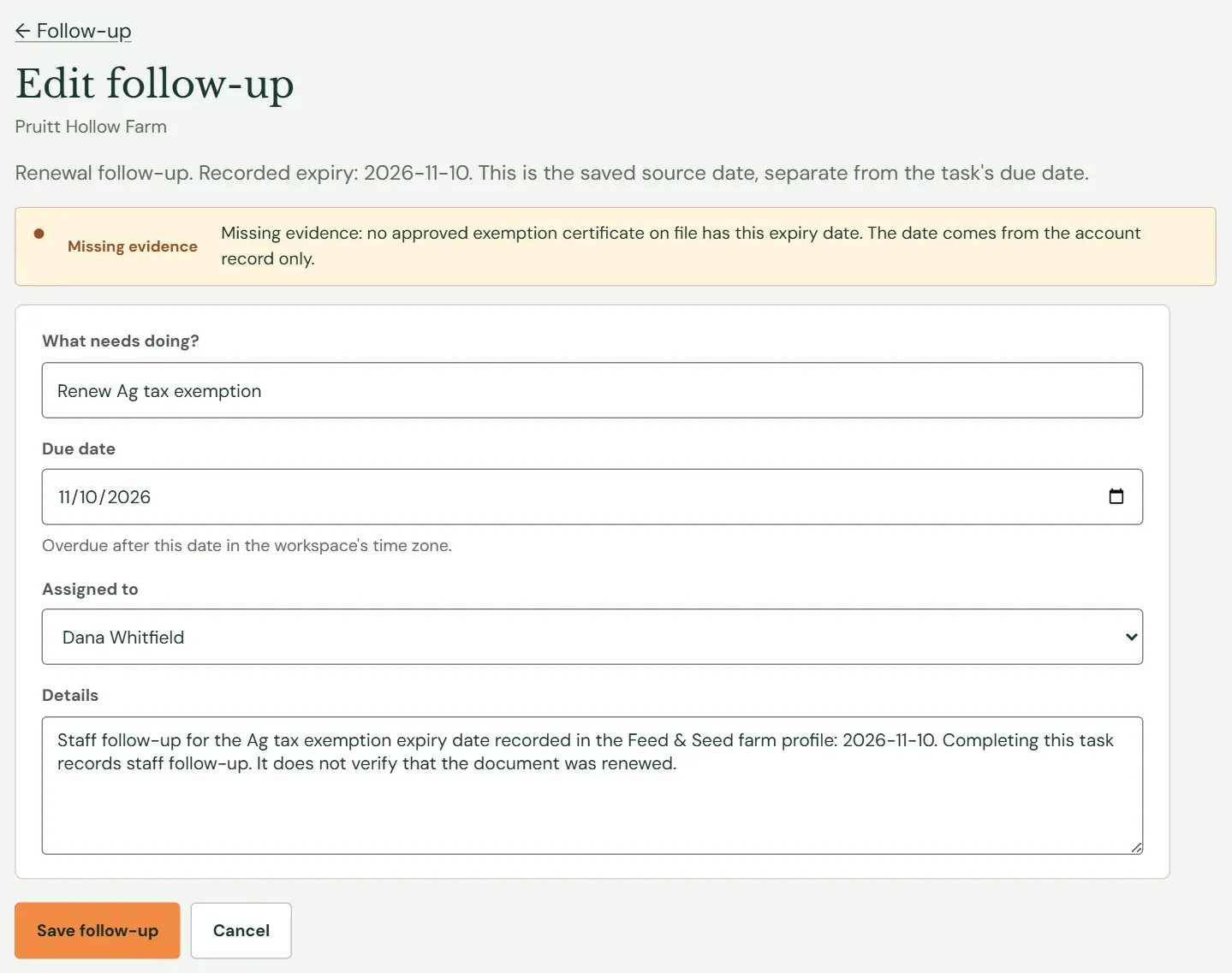
- 1Match the document and account to the call you are checking.
- 2Read why Roadside could not establish the certificate link.
- 3Compare the job's due date with the recorded expiry.
Veterinary Feed Directives and restricted-use pesticide licenses are checked at the register when the sale requires them. Their renewal follow-ups do not get a Verified badge.
Something here does not match your screen? Write to support@dirtroadsoftware.com with the name of the screen, what you pressed and what you expected. A picture of the screen helps.