
Give store credit and see where it went
Store credit is money the store owes a customer, to spend at the counter. It is kept on the customer's account, with or without a charge account.
In this chapter
Check a customer's store credit
Included on every plan except Static Website and Online Store.
A customer asks how much credit they have left, or says the credit from last month's return never showed up. The Store credit card on their account gives the balance and what last changed it. A customer does not need a charge account to have store credit.
- Store credit
- Money your store owes a customer, kept on their account for them to spend on a later purchase. It is separate from what they owe on a charge account.
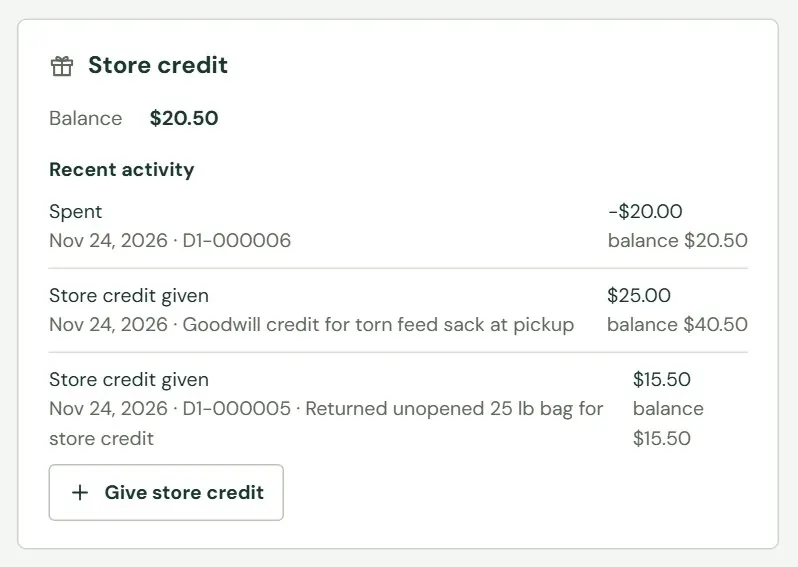
- 1Balance: what the customer has left to spend.
- 2Store credit given: credit that was added, with its date and reason.
- 3Spent: credit that paid for a sale.
- 4Give store credit adds credit by hand.
- Go to Customers, then Accounts, and open the customer.
- Find the Store credit card and read Balance.
- Read Recent activity. It lists the latest 10 entries, the newest first. Each has a date, the sale's number or the reason someone typed, the amount, and the balance after it.
| The entry reads | What happened |
|---|---|
| Store credit given | Credit was added: by hand, from a charge-account credit, or as a refund given back as store credit. |
| Spent | The customer paid for a sale with store credit. |
| Given back to store credit | A sale that was paid with store credit was refunded, and that part went back to the customer's store credit. |
You have found it when the latest entry matches the refund or the sale you were looking for. The card shows 10 entries and there is no fuller list, so for an older one open the sale itself in Sales, Orders.
A customer with none has a card that reads No store credit. It's added when a refund is given back as store credit, or by hand. Staff and Read only people do not see the card at all for a customer who has no store credit.
The balance prints in two other places. A receipt for a sale paid with store credit has a Store credit left line. A charge-account statement tells the customer the amount is theirs to spend and adds It is not part of the amount due. Refunds in Roadside are covered in Give money back for an order, in Chapter 30 of Core Roadside.
Store credit is spent on a sale. Roadside has no way to pay it out as cash or a check.
Store credit is not a gift card. It belongs to one customer's account. For gift cards, write to support@dirtroadsoftware.com.
Give store credit by hand
Included on every plan except Static Website and Online Store.
A bag split on delivery, or you want to make something right without a refund. A Manager or the Store owner adds store credit to the customer's account and types why. Staff cannot give store credit by hand.
The customer can spend it at the register from their next visit. Store credit given by hand cannot be taken back in Roadside, so check the amount before you press.
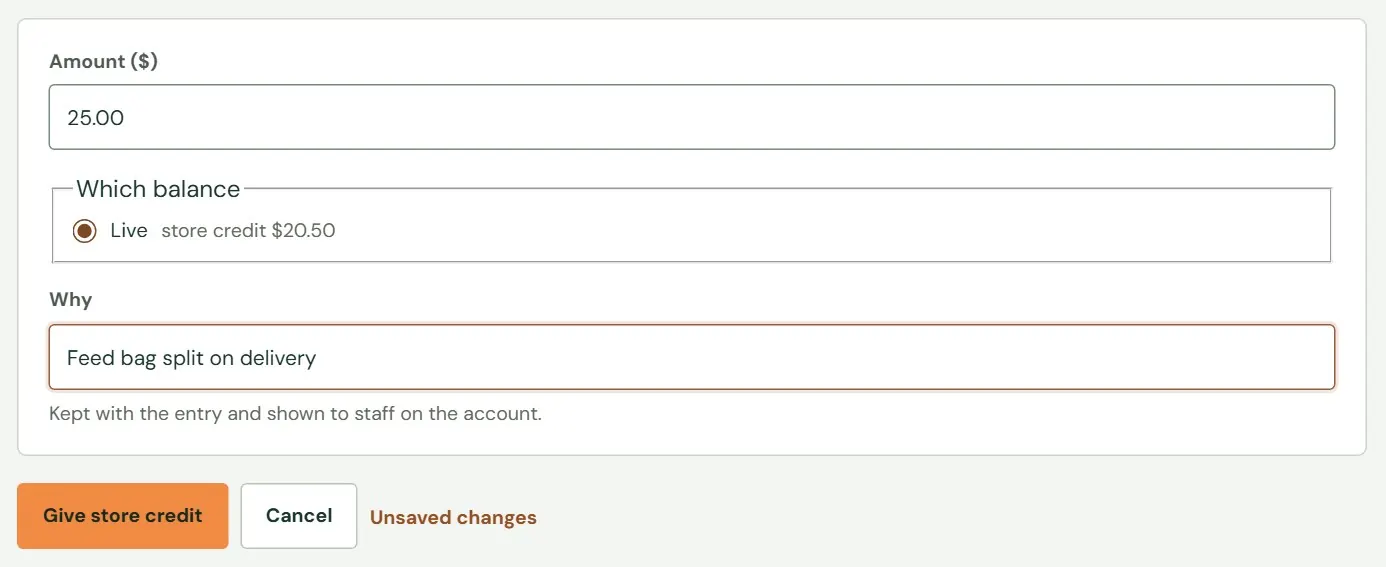
- 1Amount ($): how much credit to add.
- 2Why: the reason, kept with the entry.
- 3Give store credit adds it to the customer's balance.
- Open the customer and press Give store credit on the Store credit card. A Manager or the Store owner sees the card and its button on every customer.
- Type the Amount ($), in dollars and cents.
- Under Which balance, choose Live. The form does not post until one is chosen.
- Type the reason in Why, up to 500 characters. The screen's own example is Feed bag split on delivery. The reason is Kept with the entry and shown to staff on the account.
- Press Give store credit. Roadside says Store credit given.
The form says what this is and is not: It isn't a sale and changes no stock. To give back money from a sale as store credit, refund the sale instead. A zero amount is refused with The store credit is more than $0.00, like 10.00.
It worked when the card shows the higher Balance and a Store credit given entry with your reason. Day summary for the whole store counts it in Store credit given, as given by hand.
Move a charge-account credit to store credit
Included on every plan except Static Website and Online Store.
A customer who overpaid their charge account has a credit balance there. Left alone, it pays their next charges. If they would rather spend it on anything in the store, including on a day they pay at the counter, move it to store credit.
After the move, the amount does not pay the customer's next charges on account. It cannot be moved back.
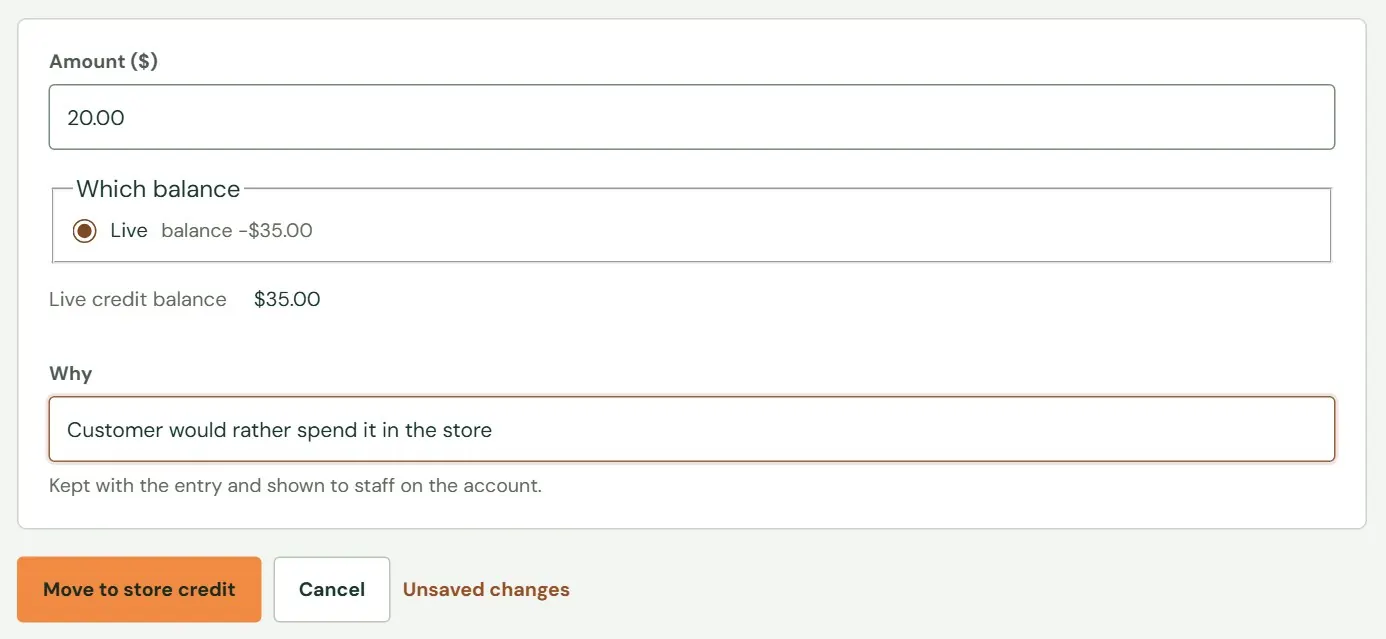
- 1Live credit balance: the most you can move.
- 2Amount ($): how much of it to move.
- 3Move to store credit takes it off the account and adds it to store credit.
- Open the customer and press Move to store credit on the Charge account card. The button shows only while the account has a credit balance.
- Read Live credit balance, then type the Amount ($). It can be all of the credit or part of it.
- Under Which balance, choose Live.
- Type the reason in Why, up to 500 characters.
- Press Move to store credit. Roadside says Moved to store credit.
The screen describes the move: It comes off the credit on the account, so it no longer pays the next charges. Ask for more than the credit balance and Roadside names the balance and says no more than that can be moved.
It worked when two cards agree. The Charge account card's credit is lower and has a Moved to store credit entry. The Store credit card's Balance is higher by the same amount, with a Store credit given entry.
To hand the credit back as cash or a store check instead, see Pay out a credit balance, in Chapter 18.
Know how store credit is given back and spent at the register
Included on every plan except Static Website and Online Store.
Most store credit starts and ends at the register. A refund can go back to the customer as store credit, and store credit can pay for a sale. An order's page in Roadside does both too: Record a payment offers Store credit when the customer has some, and a refund's Given back by offers it to a Manager or the Store owner, for a payment taken at the counter. A sale that was charged to an account goes back to the account only. Either way, Roadside shows you the result.
| At the register | On the customer's Store credit card | On Day summary |
|---|---|---|
| A refund is given back as store credit | Store credit given, or Given back to store credit when the sale had been paid with store credit | Refunds as store credit, and in Store credit given |
| Store credit pays for a sale | Spent | Store credit spent (not money taken) |
The register follows four rules, which explain most questions from the counter.
- Store credit is kept on a customer's account, so a refund can go back as store credit only for a customer who has one.
- A customer cannot spend more store credit than they have.
- When store credit pays part of a sale, the rest is paid in cash or by check, not by card and not on the charge account.
- When a sale that was paid with store credit is refunded, that part goes back to store credit, not out as cash.
Store credit spent is not money taken, and store credit given is not money paid out. Neither is in any drawer's count, and the note under Day summary's totals says so. Read the register's sales, cash and checks for a day, in Chapter 3 covers the rest of that screen.
You have the right entry when its date and amount match the sale or the refund. An entry from the register carries the sale's number when it has one, and you can search for that number in Sales, Orders.
Something here does not match your screen? Write to support@dirtroadsoftware.com with the name of the screen, what you pressed and what you expected. A picture of the screen helps.