
Payments, holds and refunds
Your card processor moves the money, and Roadside keeps the record on each order. This chapter explains how a customer's payment works in plain words, how it shows on the order, and how to give money back.
In this chapter
The ways a customer can pay
You choose which ways to offer on the Payments tab of Store settings (Payments, in Chapter 17). A customer sees only the ones you turned on.
| Way | What happens |
|---|---|
| Card, charged at checkout | The card is charged when the customer pays. The order opens as Paid. |
| Card, held | The card is held, not charged. You charge it when you confirm the order. The order opens as Authorized. |
| Bank account | The money comes straight from the customer's bank, which takes about four business days. The order waits until it arrives. |
| Pay at pickup | The order opens at once. The customer pays at the counter, or to the driver, and you record how. |
- Card processor
- The company that handles card payments for your store, such as Stripe or Clover. It is your own account with it, with its own fees and dashboard. Roadside never sees or stores card numbers. A customer types a card into the processor's secure fields.
- Hold
- Money set aside on a customer's card without taking it. The customer sees it as pending.
Dirt Road connects your card processor to Roadside and keeps its keys. To start taking cards, to change processors or to fix a connection, write to support@dirtroadsoftware.com. What you pay Dirt Road Software for Roadside is a separate matter from what customers pay you. Chapter 25, Account and Billing covers your invoices.
Holds
A store that holds cards turns on Hold the card at checkout, and charge it when you confirm the order on the Checkout tab. The customer's card is held for the full amount. You find out what you actually have on the shelf when you pull the order, then charge the card for exactly that. The customer pays for what they take home.
A hold lasts about seven days. Roadside never charges a held card unless you press a button.
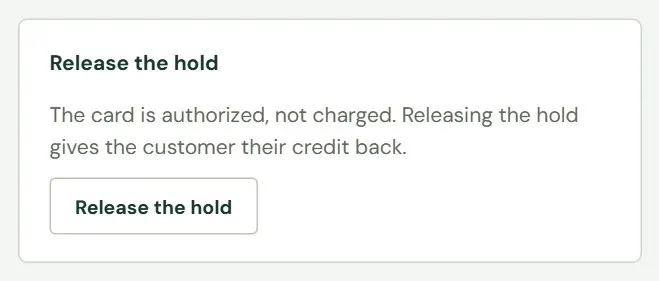
You decide what happens to a hold in one of three ways. Mark ready and charge charges the card for what is owed and marks the order ready. Charge the card charges an amount you type, up to the hold, and lets go of the rest at once (see Charge a held card for what you have, in Chapter 18). Release the hold gives the customer their credit back without taking anything. Nothing shows on the customer's statement afterward. The order stays open and unpaid, so collect payment another way.
 1
1- 1Asks you to confirm, then releases the hold.
If you do nothing, day 5 brings a warning on the order's payment box and on the Needs attention card of the Payments tab. No email goes out and no badge shows on the list, so look at those two places. At about day 6.5 Roadside releases the hold itself, because the card's own hold is about to lapse, and emails the customer and the addresses you set for new-order alerts. The customer is told to call or pay at pickup. Your order stays open.
Bank payments cannot be held. If you turn holds on, a customer who pays by bank account is charged at checkout.
Bank payments
A bank payment, which the screens call ACH, takes money from the customer's bank account instead of a card. It is off until you turn it on. It works through Stripe and not through Clover.
The money takes about four business days. While it is on its way, the order reads Payment pending and its stock stays set aside. It does not appear on the To do tab, so you do not pull it, until the bank pays. Then the order opens as Paid, you get it to prepare and the customer gets a second email. If the bank sends the payment back, the order becomes Not paid, nothing was taken, the items go back on the shelf, and Roadside emails the customer and the addresses you set for new-order alerts.
Pay at pickup
Pay at pickup is off until you turn it on. An order paid this way opens as soon as the customer places it, with the stock taken off the shelf and the pickup day booked. You record the payment when the customer comes in, or sooner if the customer paid you ahead of time (see Take an order from new to picked up, in Chapter 18). The ways to record it are Cash, Card at the counter, Check and Charged to account.
Card at the counter means you ran the card on your own machine. Roadside records that it happened and does not talk to the machine. Charged to account means the amount went on the customer's charge account with you. Roadside counts the order as paid, but the order reads Charged to account where other orders read Paid.
How a payment shows on the order
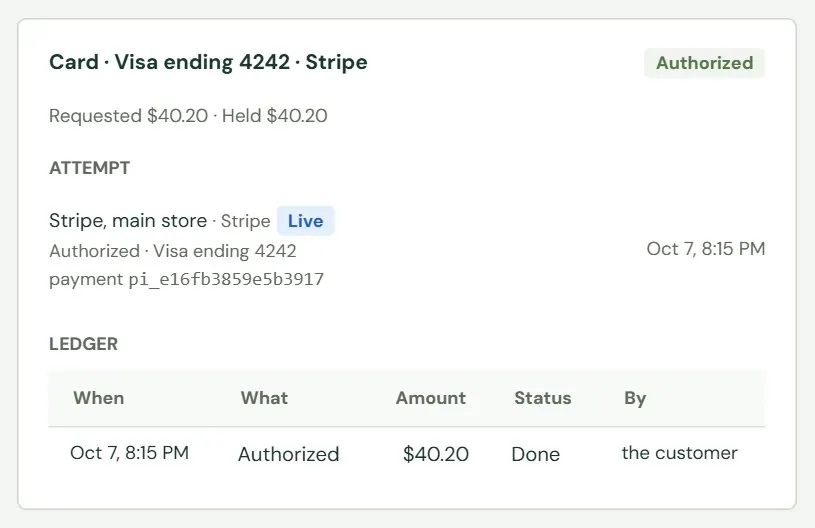
Each payment on an order has its own box. The heading says how the customer paid, such as Card · Visa ending 4242 · Stripe, Pay at pickup or Charged to account. A short line under it adds up the amounts: what was requested, held, paid and refunded. Roadside keeps only the brand and last four digits of a card.
 1234
1234- 1How the customer paid and which processor took it.
- 2Authorized, Paid, Partly refunded or Refunded.
- 3The processor, whether it is live or in test, and the card's brand and last four digits. A link to the processor's own page appears when it has one.
- 4One row for each thing that happened to the money.
The ledger reads Authorized, Charged, Released, Refunded, Paid at the counter (check 1042), Charged to account and similar. Its status reads Waiting to send, Sent, Pending, Done, Failed or Cancelled. The last column says who did it: the customer, the processor, a name from your team, or Roadside. A card that was tried more than once folds its attempts into a line such as 3 attempts.
A charge takes about a minute to show as Paid. A refund shows as Pending until the processor confirms it.
Payment issues
When something about a payment does not add up, Roadside opens a payment issue. It shows in the order's payment box, with a bold title and the words Roadside expected and It saw, and under Needs attention on the Payments tab. The order carries an orange Check badge in the list. The common titles are these.
| Title | What it means |
|---|---|
| We don't know whether a card was charged | The processor's answer was lost. The order waits until you settle it. |
| The amount paid doesn't match the order | The processor took a different amount than the order total. |
| The customer paid twice | Two payments landed. Refund one of them. |
| A refund or other action hasn't finished | A refund, charge or release was sent and has not been confirmed. |
| A card hold is about to run out | The day 5 warning. |
Store owners and Managers settle an issue with the buttons in the payment box. Staff see A manager can settle this. Press Check again first, which asks the processor once more. If it still cannot say, look in the processor's own dashboard for the payment. If the customer was charged, press It was charged and paste the payment's id exactly as the dashboard shows it. If not, press Not charged and type how you checked. Roadside allows that only once the payment is five minutes old, because the processor may not show it yet. Mark resolved closes any other issue and asks for a note.
The orange Check badge does not clear by itself, except for We don't know whether a card was charged, which clears when you settle it. A flag such as Paid, but some items went out of stock meanwhile stays on the order. Read it, deal with the shelf, and ignore the badge afterward.
A dispute is the customer's bank asking for the money back. With Stripe, the order is flagged The customer's bank opened a dispute. Answer it in Stripe., the payment box shows the reason and a due date, and Roadside emails the addresses you set for new-order alerts. You answer in Stripe's own dashboard before that date. Roadside cannot answer for you. Clover does not report disputes to Roadside, so watch for them in Clover.
Refunds
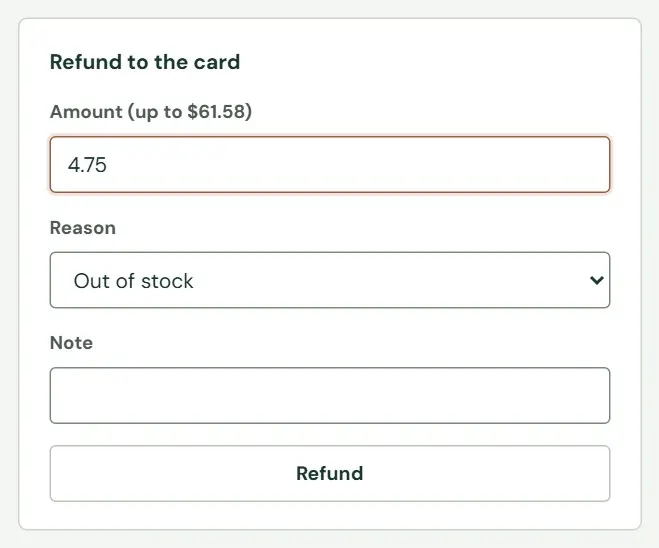
A refund gives back money that was already charged. It takes several days to reach the customer's statement. Store owners and Managers can refund. Staff cannot. A refund goes back to the way the customer paid: Refund to the card for a card or bank payment, and Refund at the counter for money taken at the counter. The box sits in the right-hand column of the order.
 1234
1234- 1Up to the amount paid. You may refund part. Type the amount yourself.
- 2Customer asked, Order cancelled, Out of stock, Charged twice, Tax exemption shown or Other.
- 3A note for your records, up to 500 characters.
- 4Asks you to confirm, then sends the refund.
- Open the order. Use the Picked up tab for one that is finished.
- Fill in the refund box. Type the Amount, choose a Reason and write a Note. The amount is not filled in for you and does not follow what you pick under Items coming back, so add the item's price and its tax yourself. For money taken at the counter, also choose Given back by and, if it helps, a check number or short note.
- Press Refund (or Record refund at the counter) and confirm. The message reads Refund of $4.75 sent to Stripe. It shows as done once Stripe confirms it.
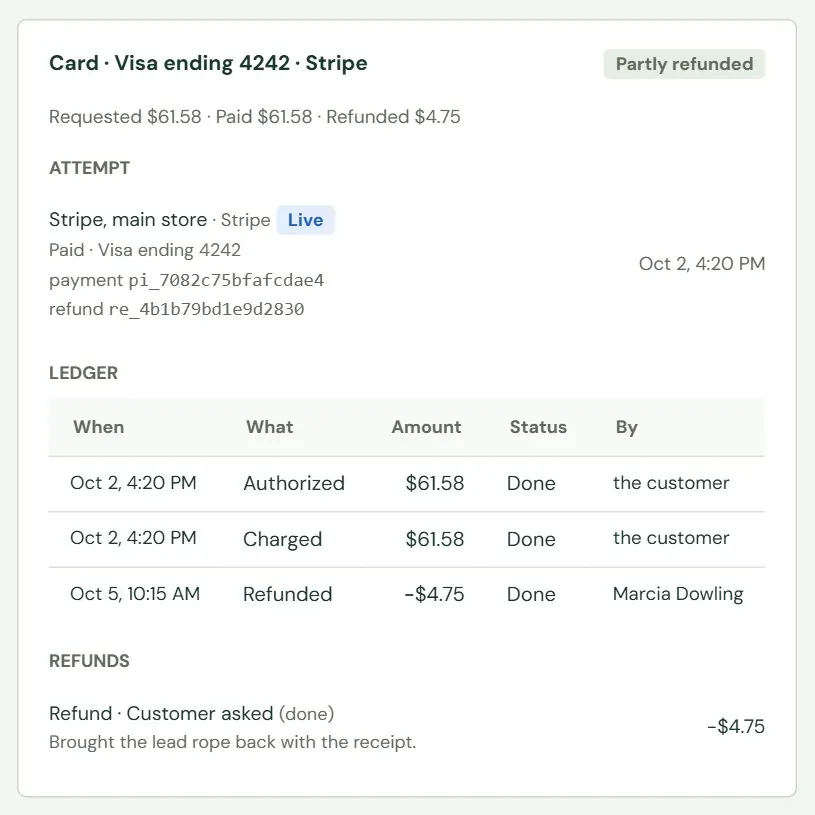
- Watch the payment box. The refund row moves from Waiting to send to Pending to Done. A partial refund makes the order read Partly refunded.
 12
12- 1The refund is a row of its own, with a minus amount and the name of the person who made it.
- 2The reason and your note.
A refund does not email the customer. The processor may send its own receipt. If the customer is waiting to hear, tell them.
On a picked-up order the refund box has an Items coming back (optional) group, with a quantity for each line, and a ticked box Put them back in stock. Roadside counts those items as returned and, with the box ticked, puts them back on the shelf. A refund with no items listed changes no stock. A refund on an order that has not been picked up does not cancel it and does not touch the stock. To cancel an order and send its payment back, use Cancel order, which puts the items back and refunds or releases the money for you (Cancel an order, in Chapter 18).
If a payment cannot be refunded through Roadside, the box says This payment can't be refunded through Roadside. Refund it with the processor directly.
Something here does not match your screen? Write to support@dirtroadsoftware.com with the name of the screen, what you pressed and what you expected. A picture of the screen helps.