
Old links
An old link is an address people saved, printed or found on Google before your website changed. This screen tells your website where each one goes now, so nobody lands on a missing page.
What happens to an old address
Your old website had pages like /about-us. The new one has /about. A flyer, a bookmark or a search result may still send a customer to the old address, and without help that customer sees a page that is not there. An old link fixes it: the website sees the old address and sends the visitor to the new one.
- Redirect
- An instruction that sends a visitor from one web address to another. Roadside calls each one an old link. An address here means the part after your website's name, like
/about-us.
Roadside already covers every product and department address from your old website, the old shop pages, and products that were merged or renamed. Add an old link only when someone tells you a link lands nowhere, or a search result does. Store owners and Managers can both add, change and remove old links.
The list runs from A to Z. The Goes to column shows the new address. A line that says Its product is gone or Its department is gone in a warning tag means the product or department an old link pointed to no longer exists; change that link or remove it. A tag that says not on the website means the page it goes to is not shown on your website now.
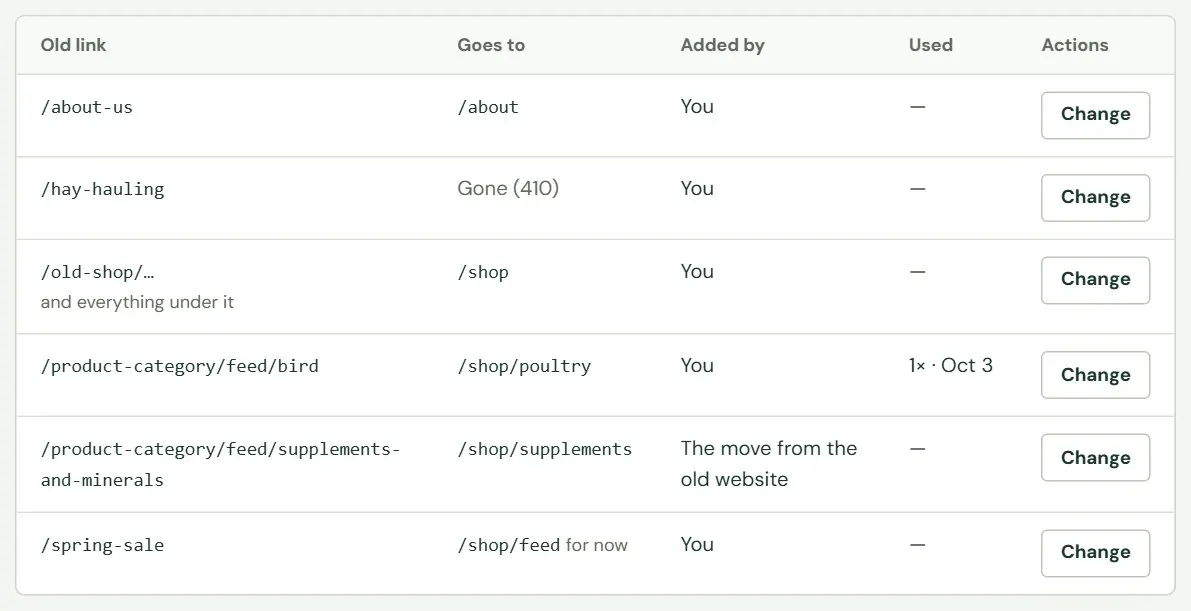 123456
- 1Old link: the address people still use.
- 2Gone (410): this address has no new home.
- 3A line under the address says it covers everything under it too.
- 4Added by: you, or something Roadside did when your website moved or a product changed.
- 5Used: how many times the link worked, and the last date. A dash means Roadside has not counted a visit.
- 6For now: a link that is only temporary.
Add an old link
The form beside the list adds one. Type the old address, say where it goes now and press Add.
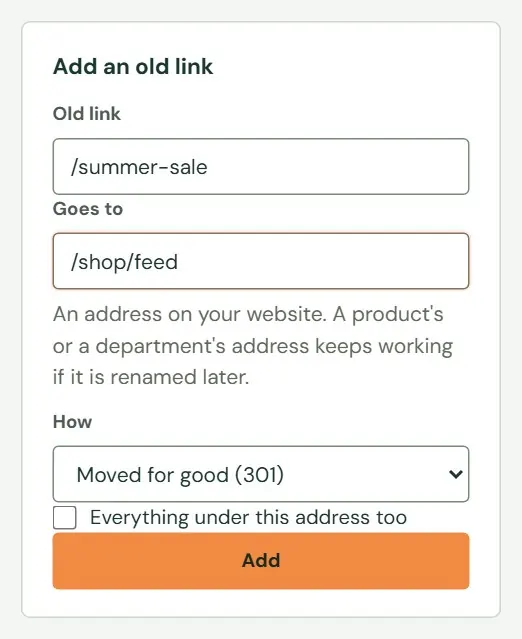 12345
12345- 1Old link. Required, up to 500 characters.
- 2Goes to. An address on your website, starting with a slash.
- 3How: Moved for good (301), For now (302), or Gone, nothing replaces it (410).
- 4Tick this to cover everything under the address too.
- 5Add.
- Type the old link. You may paste the whole web address; only the part after your website's name counts. Capital letters and a slash at the end do not matter, so
/About-Us/andabout-usare the same link. It cannot have a question mark or a hash sign in it. - Type where it goes. It has to be an address on your website, starting with a slash, like
/shop/feedor/product/triple-crown-senior. If you paste an address that starts with your website's name, Roadside trims it for you. You do not need this box for a Gone link. - Choose how it moved. The table below says which to pick.
- Tick the box to include everything under the address when a whole branch moved. A link for
/blogthen also covers/blog/anything. - Press Add. Roadside saves the link and tells you when your website will start using it: with the next update, a few minutes later (Chapter 8, How your changes reach the website).
If you save a link for an address that is already on the list, the new one replaces the old.
| Choose | When | What search engines do |
|---|---|---|
| Moved for good (301) | The page has a new home and the old address is retired. This is the usual choice. | They learn the new address and stop sending people to the old one. |
| For now (302) | A short-term stand-in, such as a sale page that is only up for the month. | They keep the old address in their lists, because you will want it back. |
| Gone, nothing replaces it (410) | A page for something you stopped offering, such as hay hauling. | They drop it, instead of looking for a new page. |
- 301, 302 and 410
- The numbers are codes a website sends along with a page, and they tell browsers and search engines what happened to it. Roadside puts them in plain words, and you only choose the words.
| If Roadside says | It means |
|---|---|
| Which old link is this? Something like /product-category/feed/ or /about-us/. | The Old link box is empty. |
| An old link can't have a ? or # part; the part before it is what gets redirected. | Take the question mark or hash sign and what follows off the old link. |
| Plain letters, numbers, dashes and slashes, up to 500 characters. | The old link has a space or an odd character. |
| Where should it go? An address on your website, starting with /, like /shop/feed or /product/triple-crown-senior. | Goes to is empty or does not start with a slash. |
| That's the same address. Send it somewhere else, or remove the redirect. | The old link and the new address are one and the same. |
Change or remove one
Press Change at the end of a row. The page opens with the old link at the top, how often it has been used and the same four fields. Fix what is wrong and press Save. If you change the Old link itself, the row takes its new name. Cancel goes back to the list.
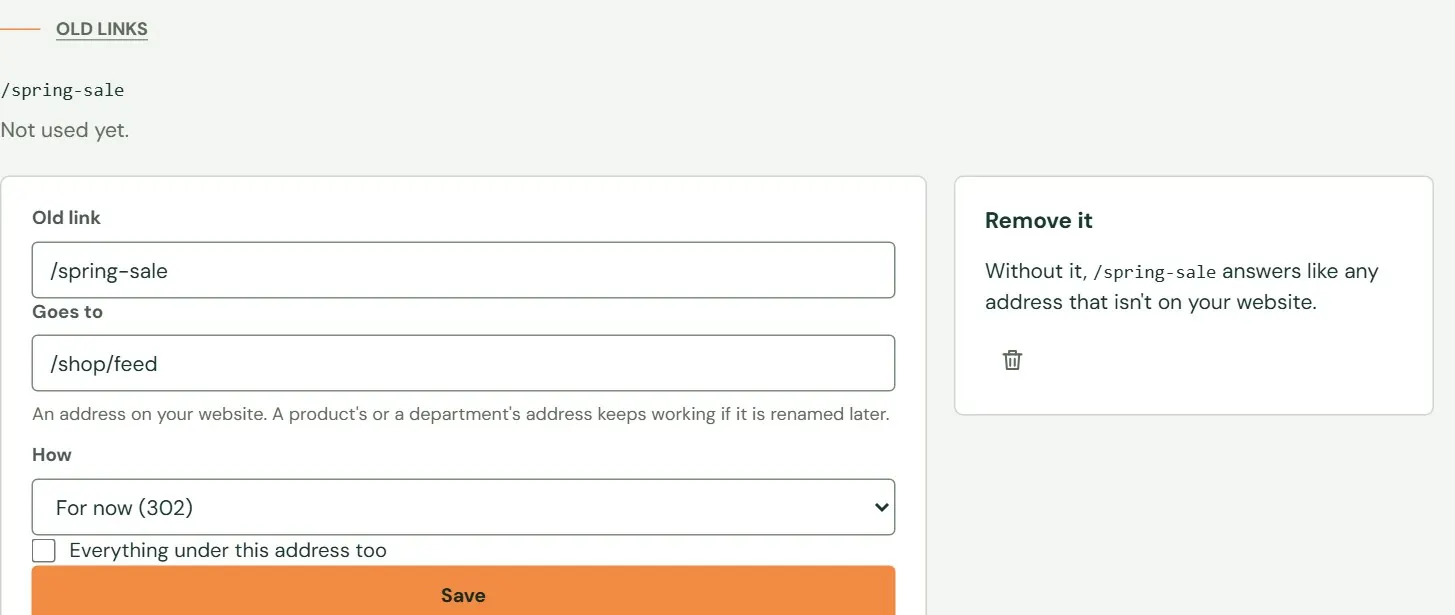 1234
1234- 1The same fields as the form on the list.
- 2How it is answered.
- 3Save.
- 4The trash button removes it, after asking you to confirm.
Removing a link means the address answers like any other address that is not on your website. Do that when you added a link by mistake. Changes to old links reach your website with the next update, so allow a few minutes.
Something here does not match your screen? Write to support@dirtroadsoftware.com with the name of the screen, what you pressed and what you expected. A picture of the screen helps.