Enter a vendor's bill and match it
Enter the vendor's invoice as a bill and match it against what you ordered and what came in. The match lists each problem it finds, for you to correct or for a Manager or the Store owner to approve.
Enter a vendor's bill
Included on Counter + Stock and Whole Store plans.
The vendor's invoice comes with the goods or a few days behind them. Enter it as a vendor bill, and Roadside checks it against the order and the receipt before anyone pays it. Store owners, Managers and Staff can enter a bill. A bill records what the vendor charges. It never changes stock on hand or the average cost.
- Vendor bill
- A vendor's invoice entered in Roadside and matched to the order and the receipt.
Most bills start from the receipt they are for.
- Open the posted receipt from the Receipts tab of Purchase orders. Its Vendor bills card lists any bill that already covers it, or reads No bill covers this receipt yet.
- Fill in Bill this receipt. The Invoice number starts with the one typed on the receipt. The Invoice date starts at today's date: check it against the invoice. Type Due, or leave it empty to work it out from the vendor's terms, and the Invoice total ($) as printed.
- Start the bill. Starting one changes no stock and no cost. Press Bill this receipt. Roadside says Bill <number> entered. Check its lines against the invoice, then match it. and opens the bill as a Draft, with a line for everything on the receipt that is not billed yet. Each line starts at the order's cost, or at the receipt's invoice cost when the delivery had no order.
For an invoice that covers several receipts, use the Enter a bill card on the Vendor bills tab. Choose the Vendor, fill in the same boxes and press Enter the bill. That bill opens with no lines.
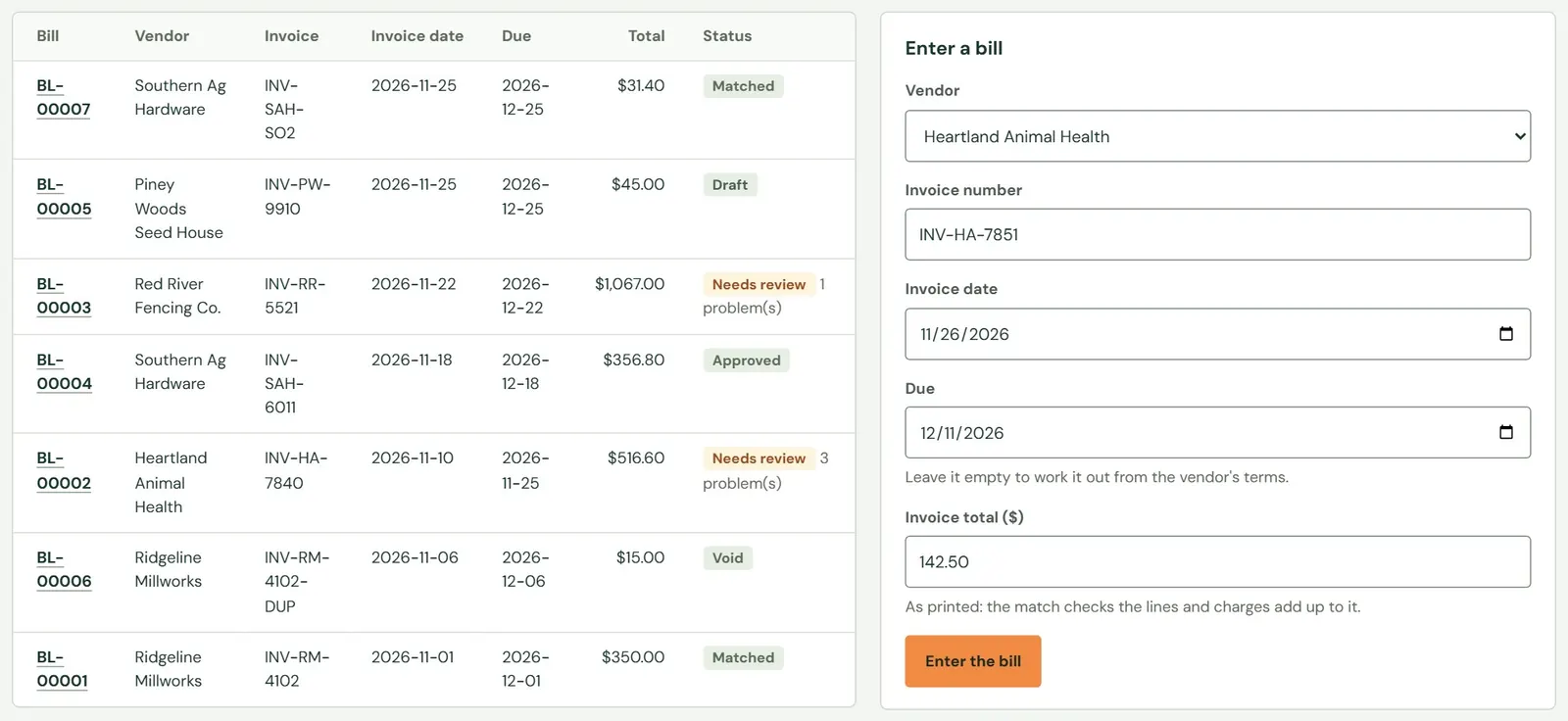
- 1Status: Draft, Matched, Needs review, Approved or Void.
- 2How many problems the match found on a bill that needs review.
- 3Invoice number: type it as the vendor printed it.
- 4Due: type the date, or leave it empty to use the vendor's terms.
- 5Enter the bill opens a draft with no lines.
Then make the draft agree with the paper invoice. Each of these changes only the bill.
- A line's quantity or cost. Press the pen on its row. Type Billed, the Cost for one unit and, if the invoice prints one, the line's Amount ($). Press Save line.
- A line that is missing. In Add a line, choose the receipt line under What it bills, type Billed and Cost ($ per unit), and press Add line. An item chosen under Or an item of yours has no receipt behind it, and the form warns A line with no receipt needs review: nothing came in for it.
- Another receipt on the same invoice. In Add a receipt, choose a posted receipt from this vendor and press Add the receipt. It brings in a line for everything that receipt still has to bill.
- Freight and other charges. In the Invoice card, type Freight ($) and Other charges ($) as the invoice has them and press Save.
Due is worked out when the vendor's terms read like Net 30 or 30 days, which is 30 days after the invoice date, or like Due on receipt, COD or Cash, which is the invoice date. Terms worded another way leave Due empty, so type the date.
- That vendor's invoice <invoice> is on <bill> already. The invoice was entered before. Open the bill the message names.
- Only a posted receipt is billed: post <receipt> first. Post the receipt (Post the receipt into stock, in Chapter 9).
- Everything on <receipt> is billed already. The receipt's Vendor bills card lists the bills that cover it.
Match a bill to the order and the receipt
Included on Counter + Stock and Whole Store plans.
Matching compares each line of the bill with the receipt line it bills and the order line behind that. Store owners, Managers and Staff can match a bill.
- Three-way match
- Checking a bill against what you ordered and what was received.
- Open the bill and read The match against the paper invoice, line by line, then the freight, the other charges and the total.
- Be sure the bill is right. A bill that matches no longer changes. Its lines, charges and invoice number are fixed, and the only way to correct it is to void it and enter the invoice again.
- Press Match the bill, under the Add a line, Add a receipt and Invoice cards.
The match ends one of two ways.
- Matched. Roadside says Matched: the bill agrees with the order and the receipts. and the badge reads Matched.
- Needs review. Roadside says The bill needs review: <n> problem(s) are listed below. The badge reads Needs review and each problem shows on its line or on the Total row. An alert says what comes next: Change the bill to agree with the invoice and match it again, or have a manager approve it with a note.
A tolerance is how far a bill may run over the order before a Manager must review it (Set how far a bill may run over the order, in Chapter 13).
| The problem, as the bill words it | What the match found |
|---|---|
| Not received: the line isn't on a posted receipt | The line bills an item that no posted receipt brought in. |
| Billed more than was received | With the vendor's other bills that are matched, approved or in review, more of a receipt line is billed than went into stock. No tolerance covers this. |
| Billed more than was ordered | More is billed against an order line than it ordered, beyond the quantity tolerance. |
| Price above the purchase order | The line's amount is more than the billed quantity at the order's cost, beyond the price tolerances. |
| Price above the receipt | The same check for a delivery that had no order, against the receipt's invoice cost. |
| Freight and charges above the receipts' landed costs | The bill's freight and other charges are more than the landed costs on its receipts for what is billed, beyond the price tolerances. |
| The invoice total isn't the sum of its lines and charges | The Invoice total ($) you typed is not the bill's lines plus its freight and other charges. |
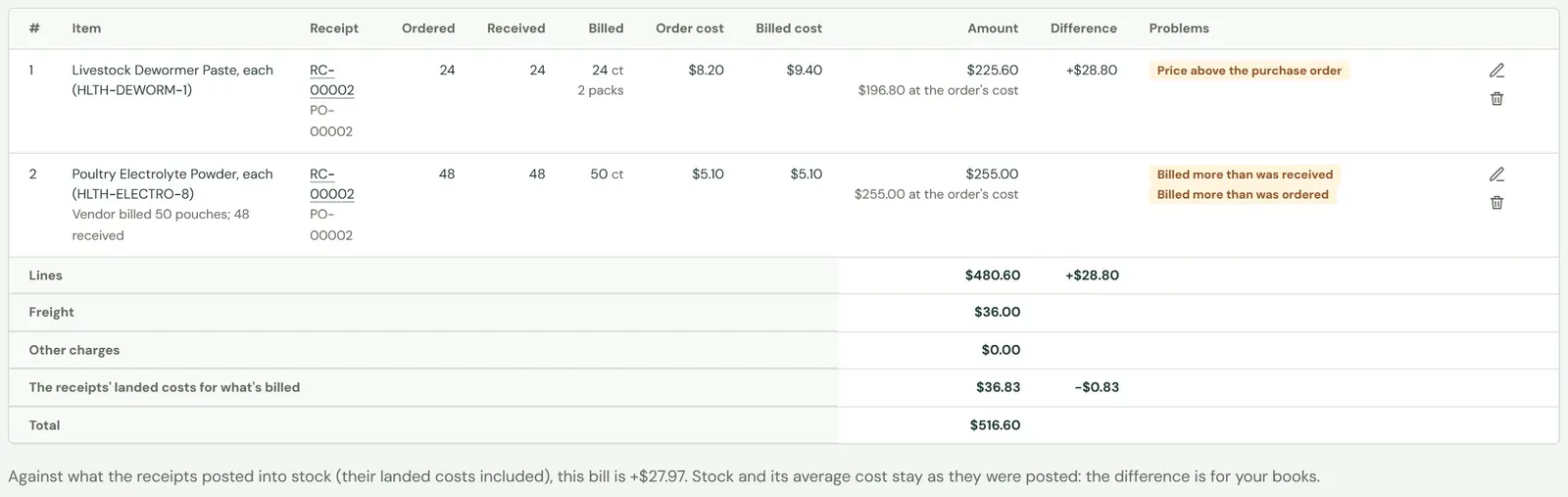
- 1Received: what the receipt line put into stock.
- 2Billed: what this bill charges for. Compare it with the invoice.
- 3Difference: the line's amount over, or under, the order's cost.
- 4Problems: read each one before you change the bill or ask for approval.
A price below the order's is never a problem. If the problem is a keying mistake, correct the line and match again. Any change to a bill that needs review puts it back to Draft, and its History records Changed, back to draft. If the bill agrees with the invoice, leave it for a Manager or the Store owner to approve (Approve a bill that needs review, in Chapter 13).
After a match the bill may carry one more sentence under the table: Against what the receipts posted into stock (their landed costs included), this bill is <difference>. Stock and its average cost stay as they were posted: the difference is for your books. Roadside shows the figure and does nothing else with it.
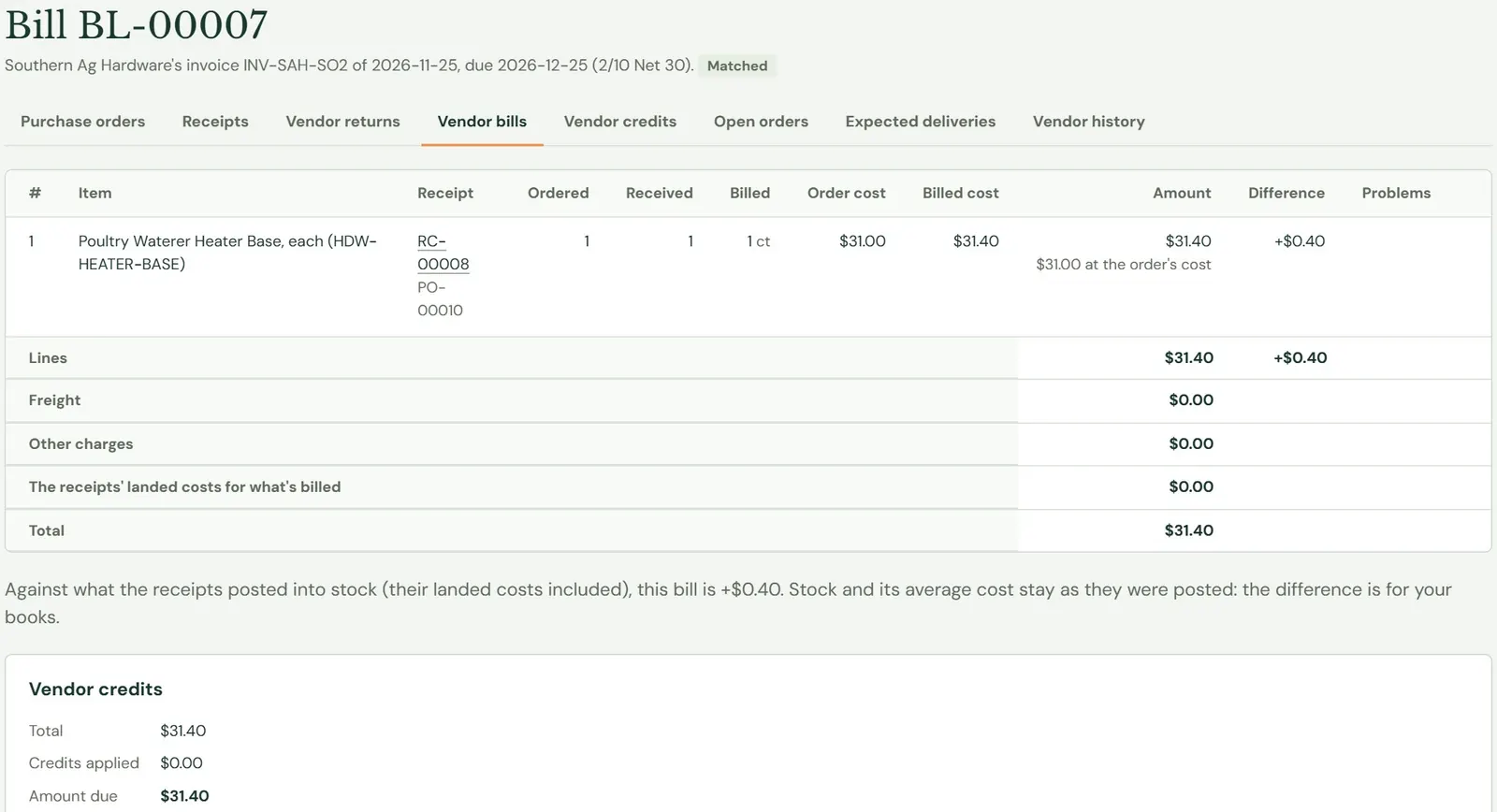
- 1Matched: the bill no longer changes.
- 2The difference from what the receipts posted into stock. Pass it to whoever keeps the books.
- 3Amount due: the total less any vendor credits applied.
Something here does not match your screen? Write to support@dirtroadsoftware.com with the name of the screen, what you pressed and what you expected. A picture of the screen helps.