Order from a vendor with a purchase order
Start an order for one vendor, add what you need in their packs, and send it. Email it with its PDF, or download it, and close what will never come.
In this chapter
Start a purchase order
Included on Counter + Stock and Whole Store plans.
A purchase order is for one vendor and one delivery location. Starting one makes a draft. Nothing is on order until you send it, and nothing reaches the vendor until you email it.
- Purchase order
- Your order to one vendor for stock delivered to one of your locations, numbered PO-00001 and up.
- On order
- What a sent purchase order still has coming. It comes off as receipts are posted, or when the order is closed or cancelled.
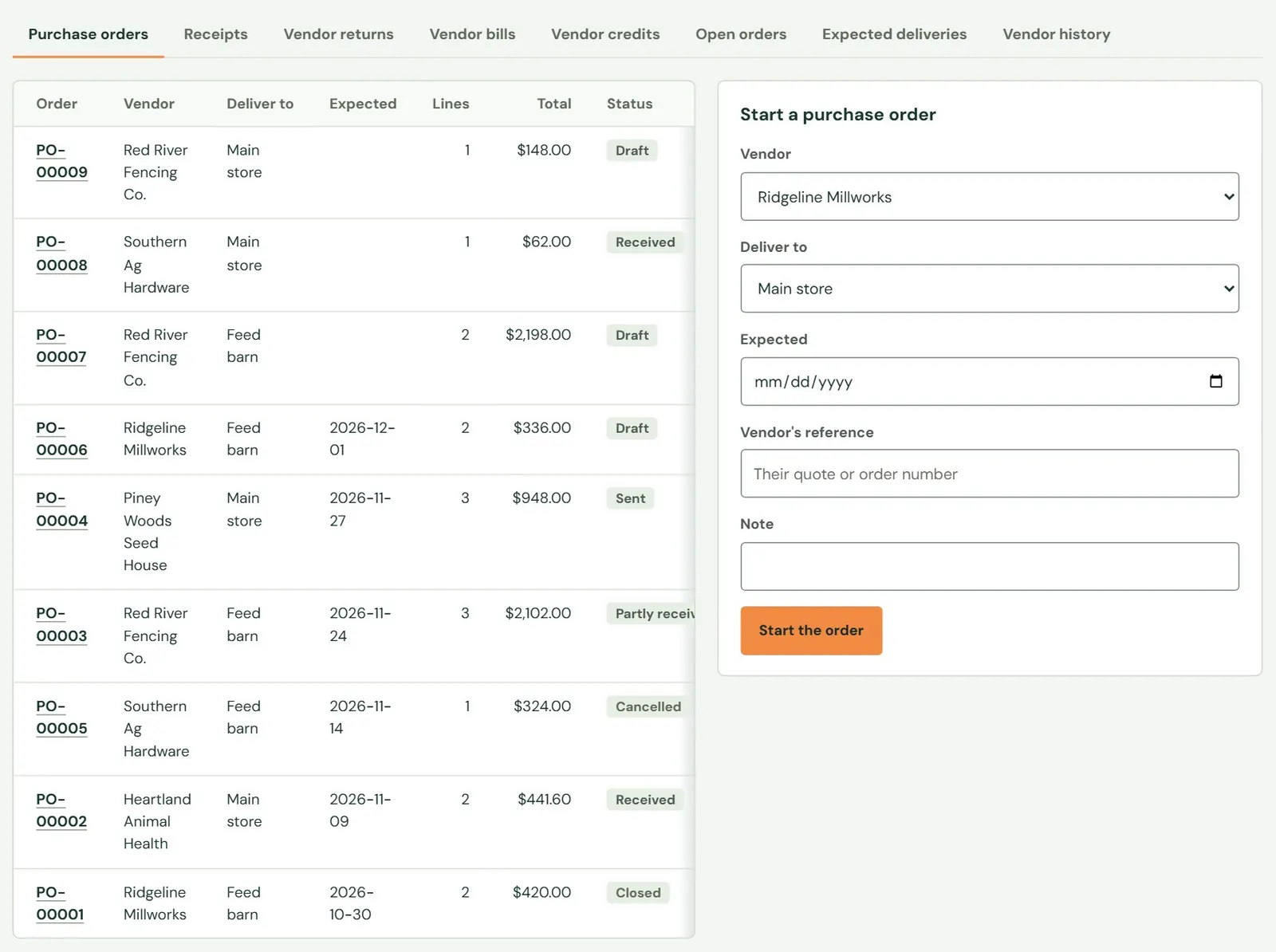
- 1Move between orders, receipts, returns, bills, credits and the three reports.
- 2Read where each order stands.
- 3Choose the vendor the order goes to.
- 4Choose the location the delivery goes to.
- 5Press to make the draft.
- Open Purchase orders and find the Start a purchase order card.
- Choose the Vendor. Only vendors that are switched on are listed. Add a vendor first: purchase orders go to one of your vendors. means the store has none (Add a vendor and its terms, in Chapter 4).
- Choose Deliver to. The default location is chosen for you. A delivery to two places needs two orders.
- Fill in what you know. Expected is the whole order's delivery day. Vendor's reference takes their quote or order number. Note stays off the vendor's copy.
- Press Start the order. Roadside says Purchase order PO-00001 started. with its number, and the order opens as Draft.
Today's Waiting for your OK lists the newest five drafts, then and 2 more (Find draft orders waiting on Today, in Chapter 2).
Add what you need in the vendor's packs
Included on Counter + Stock and Whole Store plans.
Lines change only while the order is a draft. A sent order refuses a change with A sent order's lines don't change: close it and order again.
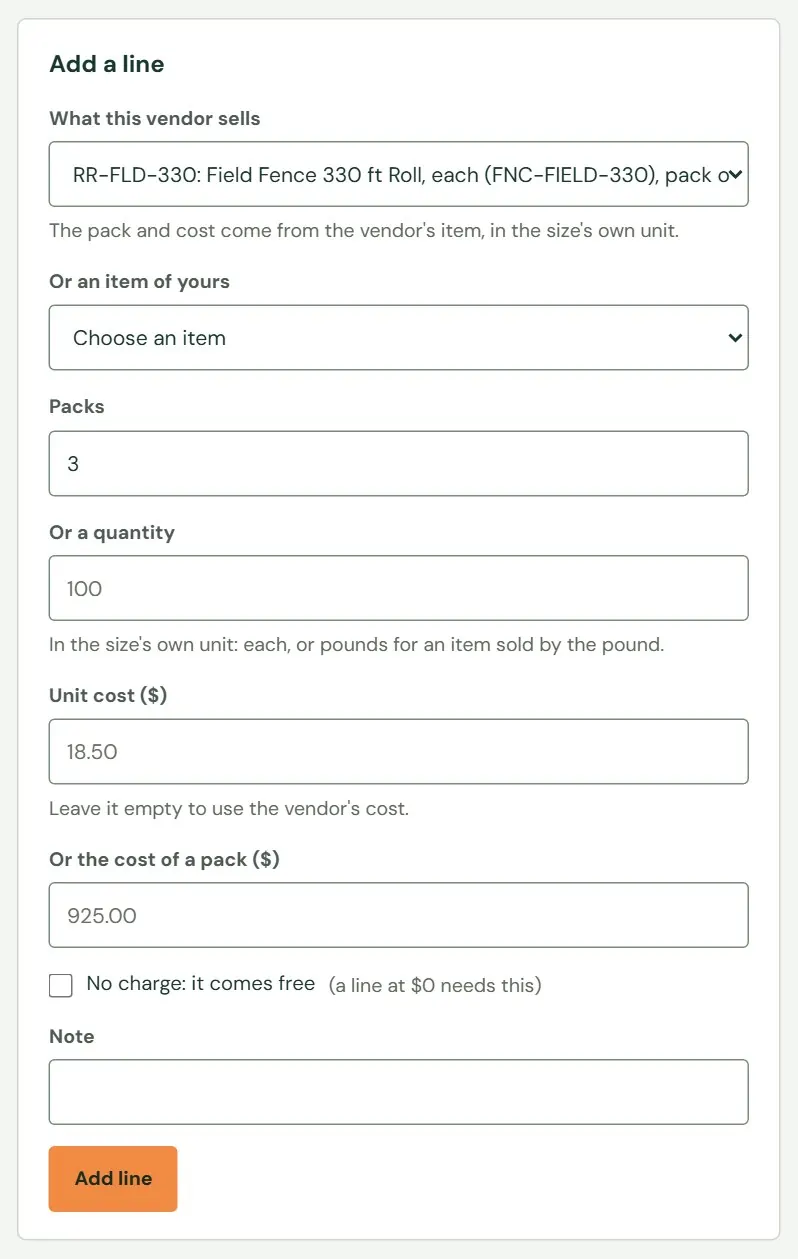
- 1Choose one of the vendor's items.
- 2Type how many of the vendor's packs to order.
- 3Tick for goods that come free.
- 4Press to put the line on the order.
- Choose the item under What this vendor sells. The pack and cost come from the vendor's item, in the size's own unit. For a size this vendor has no item for, use Or an item of yours and type its cost.
- Type Packs, or Or a quantity in the size's own unit: each, or pounds.
- Leave the cost empty to use the vendor's cost, or type Unit cost ($) or Or the cost of a pack ($).
- Tick No charge: it comes free for free goods. A $0 line without it is refused: That line has no cost. Enter what it costs, or mark it no charge if it came free.
- Press Add line. Roadside says Line added. The line shows its packs, quantity and line total, under Order total. On order reads 0 until the order is sent.
An item the vendor sells so many packs at a time (Record what a vendor sells you, in Chapter 4) reads Sold in 12s: sent as 12 ct. The extra goes on the shelf. when the quantity is not a whole multiple: sending raises the line, and its total, to the next multiple. A line's pen changes it; its trash button removes it, leaving it marked Removed. The draft's Order details card changes Expected, Vendor's reference and Note with Save details. Once the order is sent, its expected date stays.
Send the order and put it on order
Included on Counter + Stock and Whole Store plans.
Sending changes the order in Roadside only. Its quantities then count as on order. It does not reach the vendor: emailing is a separate press (Email or download the order for the vendor, in Chapter 6).
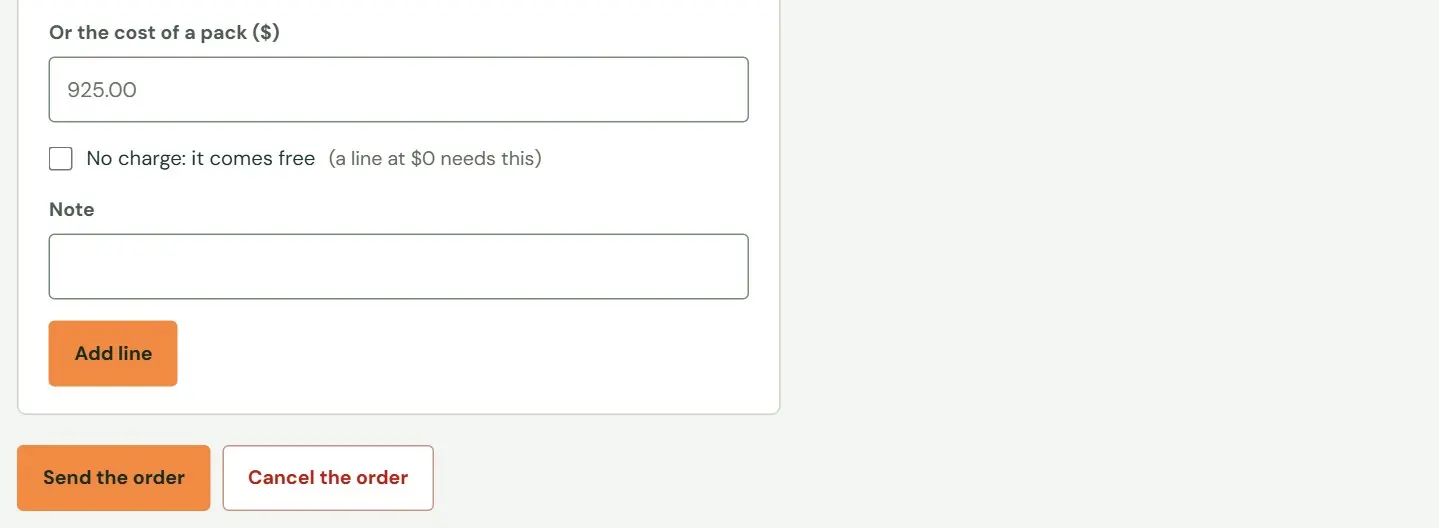
- 1Press to fix the lines and put them on order.
- 2Press instead if the draft is a mistake.
- Check every line. A draft whose lines were all removed is refused: An order needs a line before it's sent.
- Know what sending does. The lines stay as they are from then on, a line sold in multiples is raised to its next whole multiple, and every line goes on order. Nothing goes to the vendor.
- Press Send the order and confirm Send PO-00007? Its lines then stay as they are and go on order.
It worked when the badge reads Sent and On order shows each line's quantity. When the truck comes, receive against the order (Receive a delivery against its purchase order, in Chapter 9).
Email or download the order for the vendor
Included on Counter + Stock and Whole Store plans.
The Send it to the vendor card has Download PDF and Download CSV on every order. On a sent order that is not cancelled, it has Email to vendor when the vendor has an Ordering email.
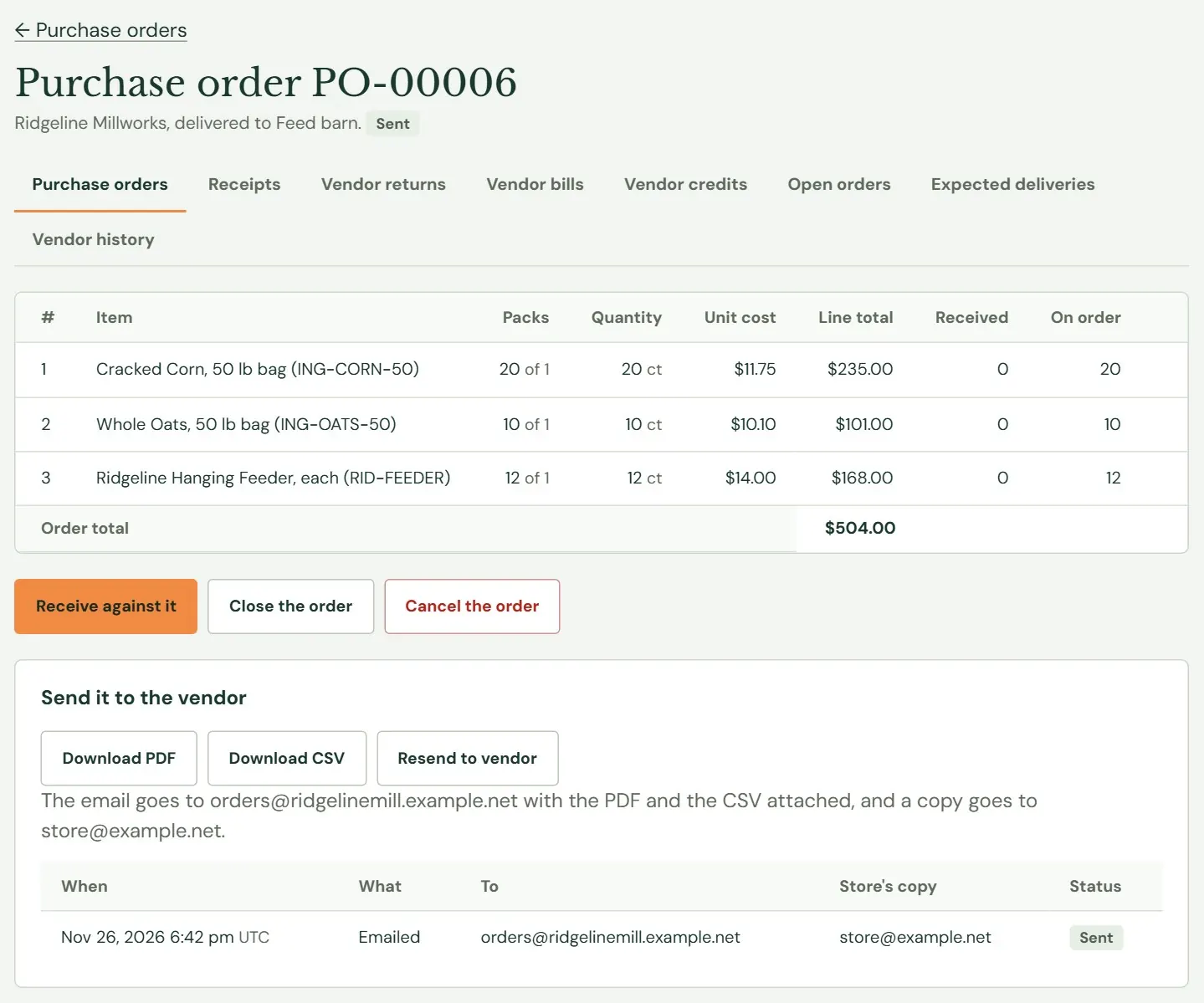
- 1Download the order as the vendor sees it.
- 2Download the lines as a spreadsheet file.
- 3Press only to send the order a second time.
- 4Read whether each email went.
- Check the address in the line The email goes to, which names the vendor's ordering email, and the store's copy when Store info has an email.
- Email it once it is right. Email to vendor sends the order to the vendor at once, with its PDF and CSV, and an email cannot be called back. Press it and confirm Email PO-00004 to orders@example.net?
- Read the answer. Order emailed to orders@example.net, followed by with a copy to your store's address when it has one, means it went; the table shows Sent.
Notes stay off the PDF. While an email is Sending, for up to 30 minutes, there is no email button; one still sending after that reads May have gone, and the button reads Resend to vendor. Then, and after Failed, check with the vendor first. A failed first email brings back Email to vendor; after a failed resend the button stays Resend to vendor. Resend to vendor sends the same order a second time, saying We are sending our purchase order PO-00004 again., so a vendor who had the first may ship twice: call first, then confirm Email PO-00004 to orders@example.net again?
Without an ordering email the card reads This vendor has no ordering email, so the order can't be emailed. Add one on the vendor's page. A store whose email is not switched on gets Email isn't set up for this store yet. Ask Dirt Road to turn it on, then email the order. A Store owner or Manager asks under Store account > Support.
Close or cancel an order
Included on Counter + Stock and Whole Store plans.
Close an order when the vendor will not send the rest. Cancel one that should never have been placed. Both take what is still open off on order and cannot be undone, and neither tells the vendor: call them.
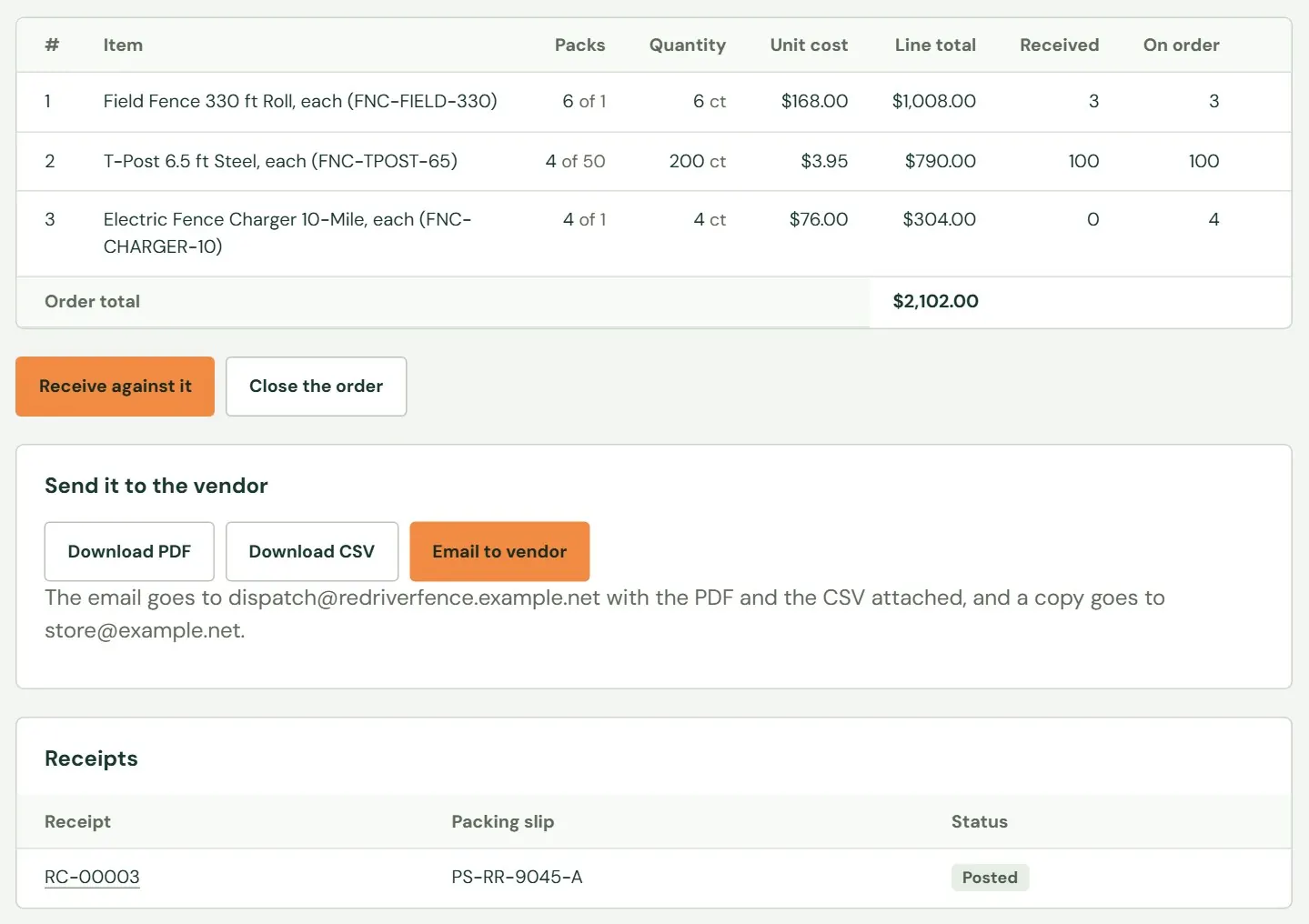
- 1Read how much of each line came in.
- 2Read what is still on order.
- 3Open the receipts posted against it.
- 4Press to give up whatever is still open.
- To close it, on a sent, partly received or received order: whatever is still open comes off on order for good, and what was received stays in stock. Press Close the order and confirm Close PO-00003? Whatever is still open comes off on order.
- To cancel it, on a draft or a sent order with nothing received: every line comes off on order and the order stays cancelled. Press Cancel the order and confirm Cancel PO-00006?
It worked when the badge reads Closed or Cancelled. An order with anything received says Something was received against this order, so it can be closed but not cancelled. For the rest later, start another order. A line reading For: and a customer's name is a special order: closing or cancelling does not cancel the customer's order: check Special orders and call them (Follow a special order to its purchase order, in Chapter 8).
Have Dusty draft an order from your reorder rules
Included on Counter + Stock and Whole Store plans.
Dusty can prepare an unsent order for one vendor and one location from the Reorder list, as a card to check; it never sends one. The button shows while Save draft orders to suppliers, for me to send, under What Dusty may do, is After my OK, as it starts. The card says supplier for vendor.
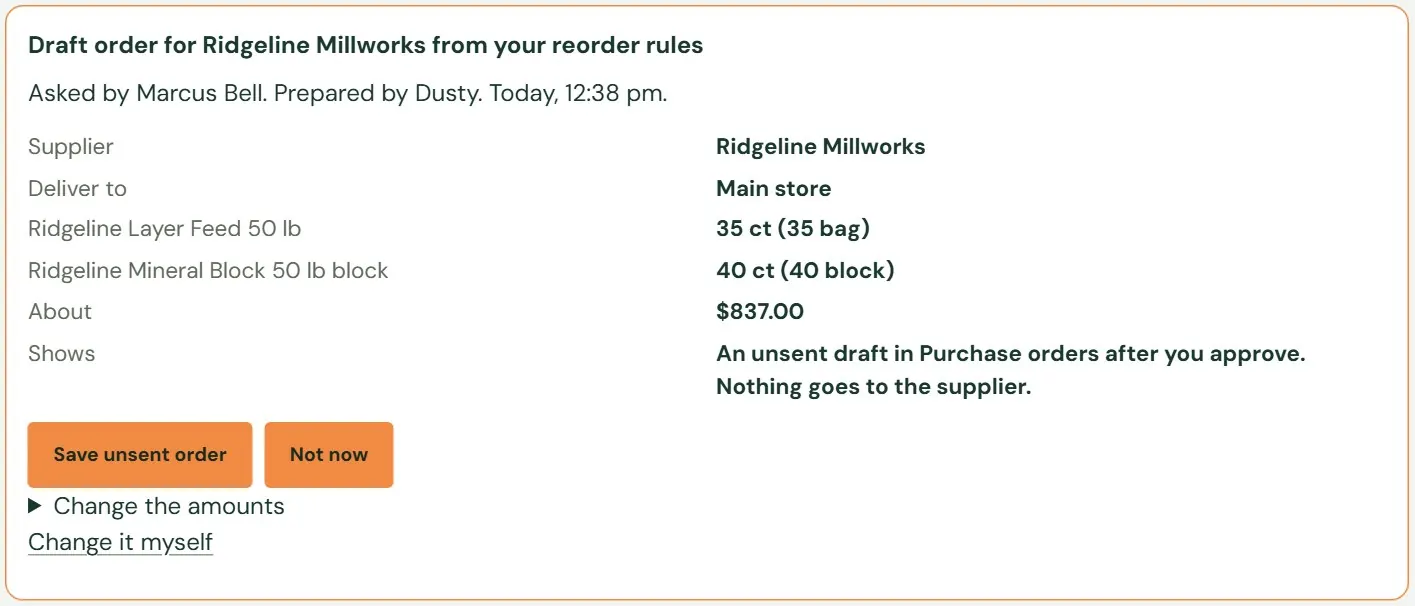
- 1Check the vendor named in the title.
- 2Check the quantity and packs on each line, starting here.
- 3Press to make the draft purchase order.
- Leave ticked one vendor's lines for one location on the Reorder list: Choose one supplier and delivery location for each card. (Turn the suggestions into draft orders, in Chapter 7).
- Press Have Dusty draft the order. The card Draft order for Ridgeline Millworks from your reorder rules opens, with each line and the total under About.
- Check it. There is already an unsent draft for this supplier and location. means it cannot save another: open that draft or add to it from the Reorder list. Change the amounts corrects the packs.
- Save it. Save unsent order makes a draft purchase order and sends nothing. Press it. The card says The unsent draft is in Purchase orders. Nothing was sent. with Open the draft.
If the figures moved while the card waited, it says The reorder figures changed. Nothing was saved. Review the current figures and approve again. Do that; once the card saves, send the draft as any other. To drop it, cancel it: Dusty does not undo orders. How a card is checked is in Look over a change and say yes, in Chapter 5 of Core Roadside.
Something here does not match your screen? Write to support@dirtroadsoftware.com with the name of the screen, what you pressed and what you expected. A picture of the screen helps.