
Work out which price a customer pays
A customer can have a price level, a contract price and a quantity price, and the item can be on sale as well. Roadside charges one price. Follow the four steps it takes, check them against a worked example, and read the price's name on the receipt.
In this chapter
See which price a customer pays
Included on Counter + Stock and Whole Store plans.
Every line is priced for the customer on the sale, at the register's location. A person on an account is priced as the account: its contract prices, and its level when it has one; the person's own level counts only while the account has none. A sale with no customer gets no level or contract price. Levels, contract prices and quantity prices are set on Customer pricing (Chapter 24, Give customers their own prices).
Included on Online Store, Counter + Online Store and Whole Store plans. The website prices for the signed-in customer and the account they buy for, at the store's default location. A shopper who is not signed in is priced as a walk-in.
- Roadside starts from the regular price at that place: a price book's price where one applies there (Add a price book, in Chapter 26), else the product's regular price.
- A contract price for the size is the customer's price, whatever its amount. Their level and the quantity prices are not looked at.
- Without a contract price, their price is the lowest of three: the regular price, their level's percent off it, and the quantity price their quantity reaches. The level and the quantity price never add together.
- A sale price lower than their price wins. Sale prices come from Discounts (Check where a discount shows and which one a customer gets, in Chapter 22 of Core Roadside).
A quantity price or a sale price takes over only when it is lower: a quantity price equal to the level's price leaves the level, and a sale price equal to the customer's price is not used. A coupon or a discount never adds on to a customer's own price: Roadside works it out on the regular price at that place, compares the result with the customer's price, and charges the better of the two. A gift card, a deposit or a fee takes no customer price.
A worked example
A 50 lb layer feed has a regular price of $19.99. The Contractor level is 10% off, which makes $17.99: the percent comes off each unit and is rounded to the cent, half a cent going up. A quantity price gives $18.50 a bag from 10 bags. Pruitt Hollow Farm has a contract price of $17.25 for the bag.
| Who buys | Bags | Pays each | Why |
|---|---|---|---|
| A walk-in customer | 4 | $19.99 | The regular price. No quantity price is reached. |
| A walk-in customer | 12 | $18.50 | The quantity price from 10 bags. |
| A customer on Contractor | 12 | $17.99 | The level's $17.99 is lower than $18.50. |
| Anyone on Pruitt Hollow Farm | 12 | $17.25 | The account's contract price. |
On sale at $17.49, the walk-in and Contractor customers pay $17.49; Pruitt Hollow Farm still pays $17.25. Where a price book sets the bag at $20.99, a Contractor customer buying 4 bags pays $18.89 there.
A register that is offline prices sales from the copy of customer prices and price books it last received, so it can charge an older price. Roadside books such a sale at the price charged. When a line cost a customer more than their own price would give by the rules, the sale shows on Offline problems as Booked, needs review, so the difference can be given back (Check offline sales that need a look, in Chapter 6 of Counter & Charge Accounts).
The store's receipt prints the customer price's name under the item: Contract price, the level with its percent, such as Contractor (10% off), or Quantity price, 10 or more. A price book's name is printed where the book's price differs from the product's regular price. Nothing is printed for the regular price.
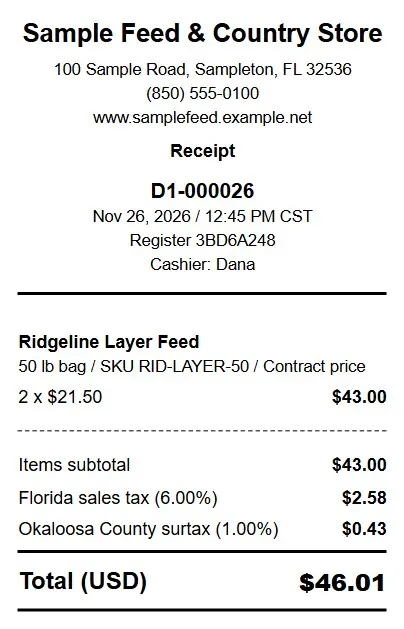
- 1The price the line was charged at. If it is not what you expected, check the customer's page against the rules above.
Something here does not match your screen? Write to support@dirtroadsoftware.com with the name of the screen, what you pressed and what you expected. A picture of the screen helps.