
See what Storehouse adds and how your store moves over
Storehouse ERP adds buying, receiving, counting by location, lots and customer prices to the basic stock you already keep. Dirt Road moves the store over; this chapter shows what changes on the screens you know, and what to do if a screen says the move is not finished.
What Storehouse adds to basic stock
Included on Counter + Stock and Whole Store plans.
Basic stock keeps one count for each size. Storehouse ERP keeps the rest beside it: who you buy from, what is on order, what came in and what it cost, where each size sits, its lot, and what each customer pays. The products are the same records the website shows and Crossroads POS rings up.
- Storehouse ERP
- The part of Roadside that keeps purchasing, receiving, stock by location, lots and customer prices.
- Vendor
- A company you buy from, set up under Stock and purchasing > Vendors.
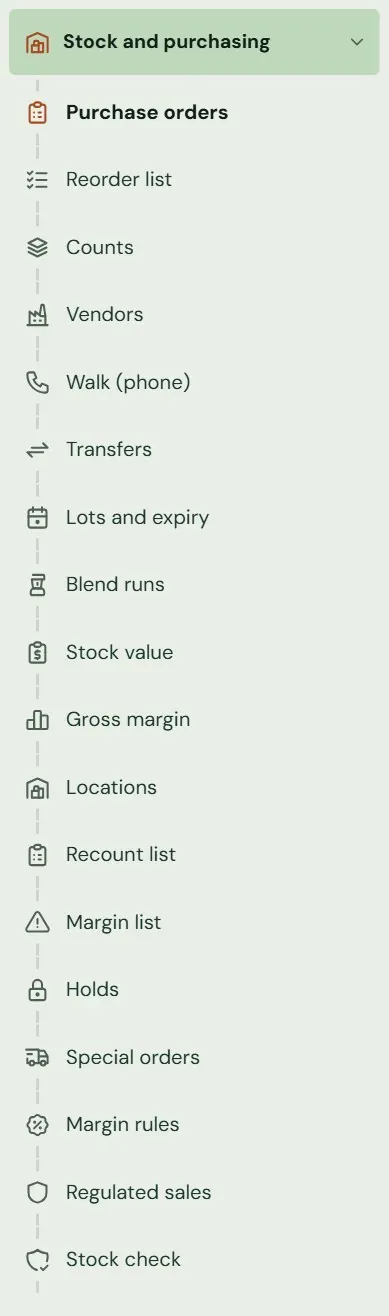
- 1Stock and purchasing: press it to open the group. Every line in it is Storehouse's.
- 2Counts: open it to count a location.
- 3Walk (phone): open it on a phone to count or receive.
- 4Stock check: the last line. Store owners and Managers see it.
The menu gains a group, Stock and purchasing, two lines under Products and two under Store settings. Each line shows only to a person who may open it.
A Store owner and a Manager see every line. Staff see Purchase orders, Reorder list, Counts, Vendors, Walk (phone), Transfers, Lots and expiry, Blend runs, Locations, Recount list, Holds and Special orders, and Price changes under Products. A Read only person has no Stock and purchasing group. You are in the right place when you open Stock and purchasing and find the lines for your role. What each role can do on those screens is in Who on your team can do what, in Chapter 2.
A product's page gains a row of buttons: Barcodes, Kits, Blend, Sale rules, Cost history, Set up a price change and Bins. Find Storehouse's buttons on a product, in Chapter 3 says what each one does and who sees it.
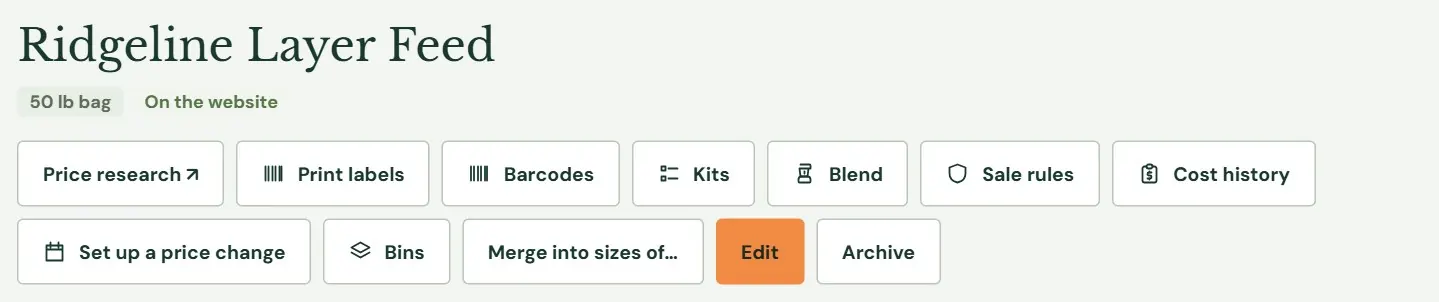
- 1Barcodes: give a size more than one barcode.
- 2Kits: sell a size as a set of other products.
- 3Cost history: read each change of a size's cost.
- 4Set up a price change: start one for this product's sizes.
- 5Bins: see where each size lives at each location.
What stays as it was
The basic stock screens stay and keep working: Track, Reorder point, Hold back for the store, Update stock, the stock grid, Stock history and the Stock on hand card (Chapter 18 of Core Roadside, Count the shelf and record deliveries). Update stock still records a change at once, at the store's default location, and Storehouse records the same change. A delivery received against its purchase order is already counted, so do not add it again with Update stock (Receive a delivery against its purchase order, in Chapter 9).
The store has two lists of the companies it buys from, and they are not joined. Purchase orders, receipts for deliveries, vendor returns, bills, credits, price files and the Reorder list use Vendors. The Suppliers card on a product's page is basic stock's own list. It stays, and a supplier added there is not a vendor you can order from.
The cashier's side of the same stock is in the Crossroads POS manual, Where the numbers come from.
How your store moves over to Storehouse
Included on Counter + Stock and Whole Store plans.
No screen in Roadside switches Storehouse on or moves a store over. Dirt Road does both, and checks the move before making it. Nothing is lost: Roadside goes on keeping every product, price and stock change, and Storehouse records the same change at the same moment.
After the move, the menu lines and product buttons above are there for each person whose role allows them, and:
- The search box on Products also finds a size by any of its other barcodes, such as a case code, when you type the barcode's digits.
- The customer prices and price books you set are what the counter charges.
Included on Online Store, Counter + Online Store and Whole Store plans. The website charges them too.
Your vendors are not brought over from the Suppliers cards. Look at Stock and purchasing > Vendors first: Dirt Road may have listed your vendors while setting the store up. Add any that are missing before your first purchase order (Add a vendor and its terms, in Chapter 4).
If a screen says your products or prices are still kept in Roadside
A store that has moved over does not see the lines below. If one shows, that part of your store is still kept in Roadside.
| Where | The screen says | What it means |
|---|---|---|
| Customer pricing, one customer's pricing page and Price books | These prices take effect once your store's prices are kept in Storehouse. | What you set is saved and waits. Until then the counter charges your regular and sale prices, and so does the website on a plan with the Online Store. |
| Barcodes, on a product | This store's products are still kept in Roadside, which keeps one barcode for each size. Barcodes beyond the first start once your products are kept in Storehouse. | Adding a second barcode to a size is refused until then. |
| Recall report, on a lot | This store's stock hasn't moved over to Storehouse yet, so its register and website sales aren't in the stock record and can't be listed here. | The report cannot name the customers who bought the lot. |
Send Dirt Road a ticket from Store account > Support and name the screen and what it says (Send a question about Roadside, in Chapter 40 of Core Roadside). Nothing you set on those screens is lost while you wait. The move is in place when Products > Customer pricing opens with no notice above its cards.
Something here does not match your screen? Write to support@dirtroadsoftware.com with the name of the screen, what you pressed and what you expected. A picture of the screen helps.