
Add up the store's day and enter the till total
A store without the register has one page for the day's figures. It adds up the online orders and the refunds, takes the till total a manager counts at close, and gives one total for the day.
In this chapter
See what the store took on one day
Included on the Online Store plan.
On the Counter, Counter + Online Store, Counter + Stock and Whole Store plans: Your store has the register, so Today's totals is not in your menu. The register's Day summary has the day's figures: Read the register's sales, cash and checks for a day, in Chapter 3 of Counter & Charge Accounts.
Today's totals opens on today. The line under the heading gives the date and says that the day runs midnight to midnight in the store's time, with the time zone named in brackets. Everything on the page is for that one day.
- Go to Orders, then Today's totals. If the Orders group does not list it, press Full menu near the foot of the menu (Find a screen in the full menu, in Chapter 1).
- For another day, choose it under Day and press Show. The calendar goes back to January 1, 2000 and stops at today.
- Read each line as a count and an amount. A line such as 3 · $148.20 is three orders that come to $148.20.
- Press Back to today to leave an earlier day.
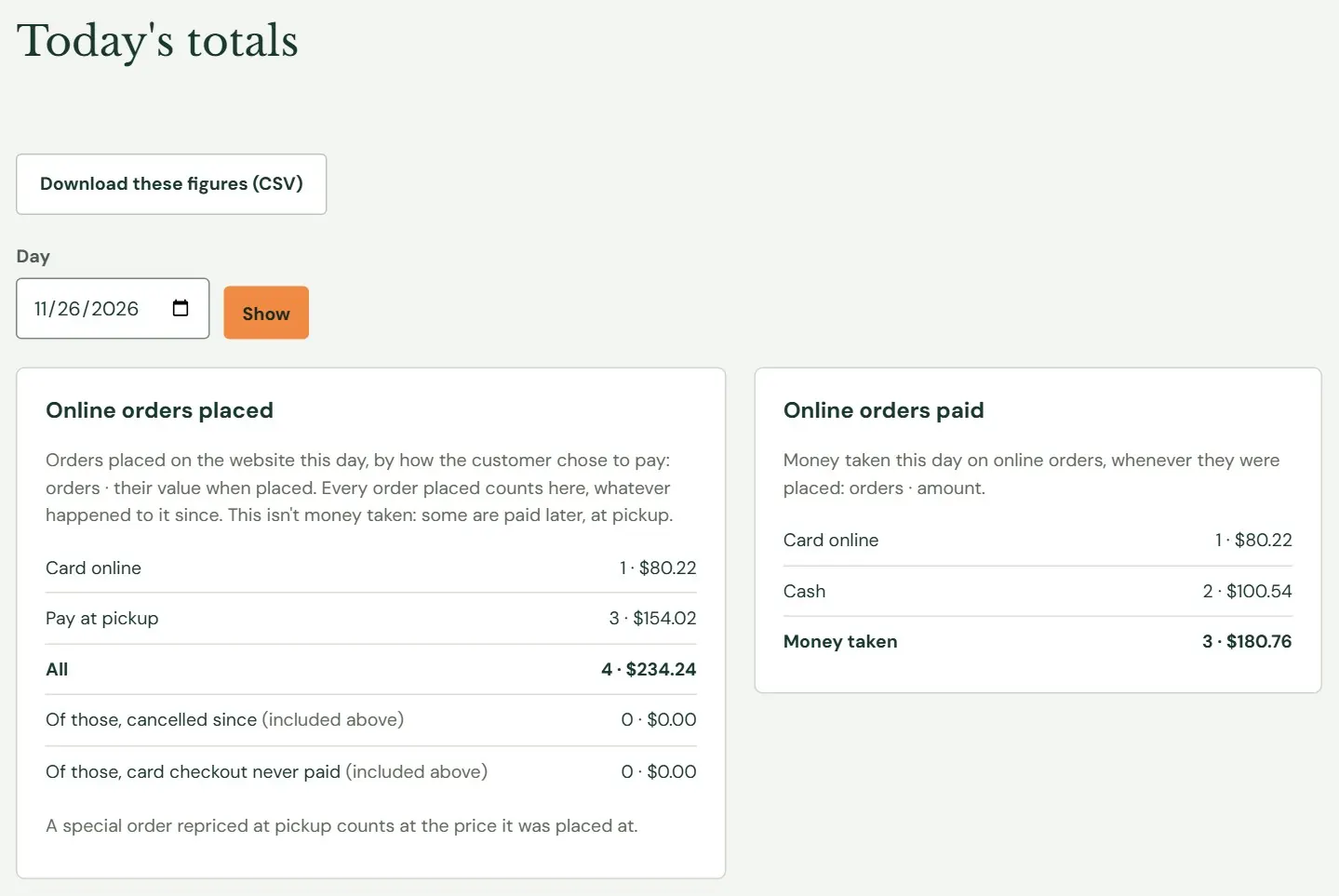
- 1Day: the date the page adds up.
- 2Show opens the day you chose.
- 3Online orders placed: orders, and their value when placed.
- 4Online orders paid: the money taken that day.
- 5Download these figures (CSV) saves the day as a spreadsheet file.
| Card | What it adds up for the day |
|---|---|
| Online orders placed | Orders placed on the website, at their value when placed. This is not money taken. |
| Online orders paid | Money taken on online orders, whenever they were placed. |
| Online orders picked up | Orders collected at the store. |
| Online orders shipped or delivered | Orders marked shipped or delivered. |
| Refunds | Refunds that went through, on any order. |
| Till total at close | What the till held at close, typed in by a Manager or Store owner. |
| Combined day total | The money Roadside recorded, plus the till total, less the money refunded. |
Returned checks and reversals is drawn only on a day that has some. So is Other money Roadside took, which holds money taken on orders that did not come from the website.
Store owners, Managers, Staff and Read only people can all open the page and download its figures. Entering the till total is for Store owners and Managers.
Tell orders placed from money taken
Included on the Online Store plan.
Four cards count online orders, each by a different date. Online orders placed goes by the day the customer ordered. Online orders paid goes by the day the money was taken. Online orders picked up and Online orders shipped or delivered go by the day the order was finished.
One order can be on three days. A customer orders on Monday to pay at pickup, and collects on Thursday. Monday counts one order under Online orders placed, in the Pay at pickup row, and no money. Thursday counts its money under Online orders paid and the order under Online orders picked up.
| Card | Its rows | What to know |
|---|---|---|
| Online orders placed | A row for each way customers chose to pay that day, from Card online, Bank account online (ACH), Pay at pickup and No payment started, then All | The rows follow how the customer chose to pay. Every order placed counts, whatever happened to it since. Two more rows, Of those, cancelled since (included above) and Of those, card checkout never paid (included above), pick out orders already counted. |
| Online orders paid | Card online, Bank account online (ACH), Cash, Check, Card on your own terminal, then Money taken | The rows follow how the money came in. A day with none reads No money taken on online orders. |
| Online orders picked up | The same rows as Online orders placed, then All | The rows follow how the order was set to be paid. The money itself is under Online orders paid, on the day it was taken. |
| Online orders shipped or delivered | Delivered and Shipped, whichever the day has, then All | These are not pickups. A day with none reads None shipped or delivered. |
Card on your own terminal is a payment someone recorded on the order as Card at the counter (Record what the customer paid at pickup, in Chapter 28). Cash and Check are recorded the same way.
Read the day's refunds and the checks sent back
Included on the Online Store plan.
The Refunds card lists the refunds that went through that day, on any order, by how the money went back. A refund counts on the day it first went through, which can be later than the day someone pressed the button. A day with none reads No refunds.
| Row on the Refunds card | What it is |
|---|---|
| Back to the card, Back to the bank account | Refunds sent through your card processor. |
| Cash, Store check, On your own card terminal | Money your store handed back and recorded on the order. |
| Money refunded | The total that left the store, shown with a minus sign. The combined total takes it off. |
This page reports refunds. It does not give one. Store owners and Managers refund an order from the order itself (Give money back for an order, in Chapter 30).
- Reversal
- A payment or a refund that was undone after it went through, such as a check the bank sent back.
Returned checks and reversals lists what was recorded that day. A check the bank sent back comes off the day it was marked returned, in the row Checks the bank sent back. What the customer pays back for it is an ordinary payment, counted on the day they pay in the card that order's payments belong to: Online orders paid for an order from the website, Other money Roadside took for any other order. A fee you collect on the check has its own row here, beginning Returned-check fees collected. The other rows are Payments reversed and Refunds that failed after going through (the money came back). Net adds the card up, and it is below zero on a day when more came off than went on.
Find a check the bank sent back, in Chapter 30 shows where to find a returned check and the order it paid.
Enter the till total at close
Included on the Online Store plan.
Roadside does not record walk-in sales on a store without the register. The till total is the only place they are counted. A Store owner or Manager counts the till at close and types in what it held: one figure, or the cash, the card slips and the checks separately.
- Till total at close
- What the store's till held when the store closed for the day, counted by a manager and typed into Today's totals.
Saving the till total changes the Combined day total on this page and in the downloaded file. It moves no money, and it changes no order and no stock count. Roadside keeps one till total for each day, so saving again replaces the figure that was there.
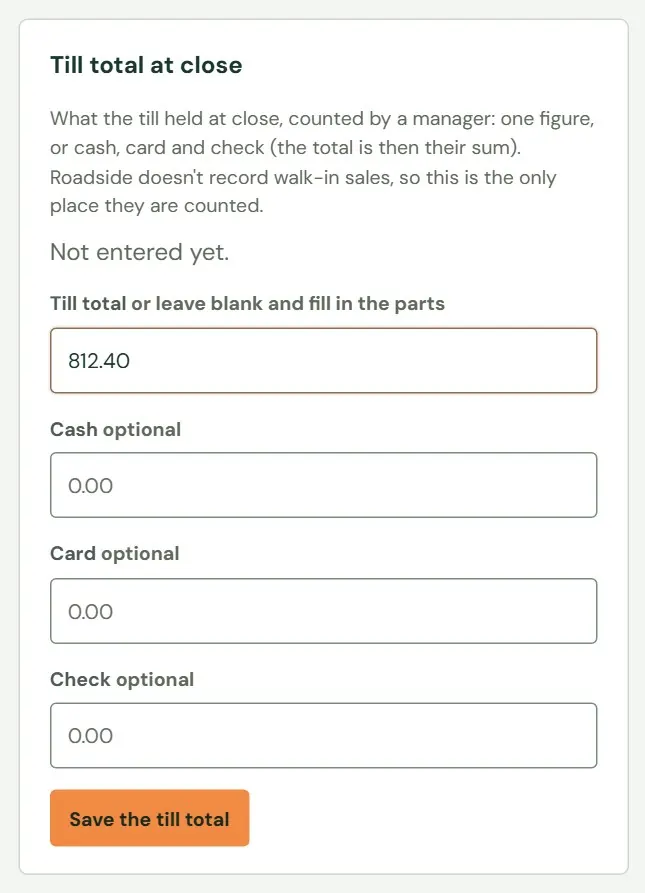
- 1Till total: one figure for the whole till.
- 2Cash, Card and Check: the parts, each optional.
- 3Save the till total keeps what you typed.
- Count the till at close.
- Open Today's totals and find Till total at close. For a day you missed, choose it under Day and press Show first.
- Type one figure in Till total, in dollars and cents. Or leave it blank and type what you counted in Cash, Card and Check. Each of the three is optional, and the total is then their sum.
- Press Save the till total. The message reads Till total saved. The card lists the parts you typed and the Till total, with a line that begins Last entered by and gives the name, the date and the time.
- Check Combined day total. Its line Plus the till total at close carries your figure.
To correct a figure, open the same day, type over it and press Change the till total. The message reads Till total changed. Any day up to today can be corrected. Each save is kept in the Audit log under the person who made it, with the figures before and after (Find who changed a store record, in Chapter 41).
| The message says | What to do |
|---|---|
| Enter the till total, or the cash, card and check in it. | Every box was empty. Type a total or at least one part. |
| The till total ($812.40) isn't cash + card + check ($800.00). Leave the total blank to use their sum, or correct it. | The total and the parts disagree. Clear Till total, or make the figures match. |
| Cash can't be below zero. | A box had a minus sign. The message names the box. |
| Cash can be at most $999,999.99. | A box had more than the largest figure it takes. |
Staff and Read only people see the card without the boxes. Until a total is saved it reads Not entered yet. A manager enters it at close.
Check the combined total for money counted twice
Included on the Online Store plan.
The Combined day total card puts the day on one line. It starts with what Roadside recorded, adds the till, and takes off the refunds.
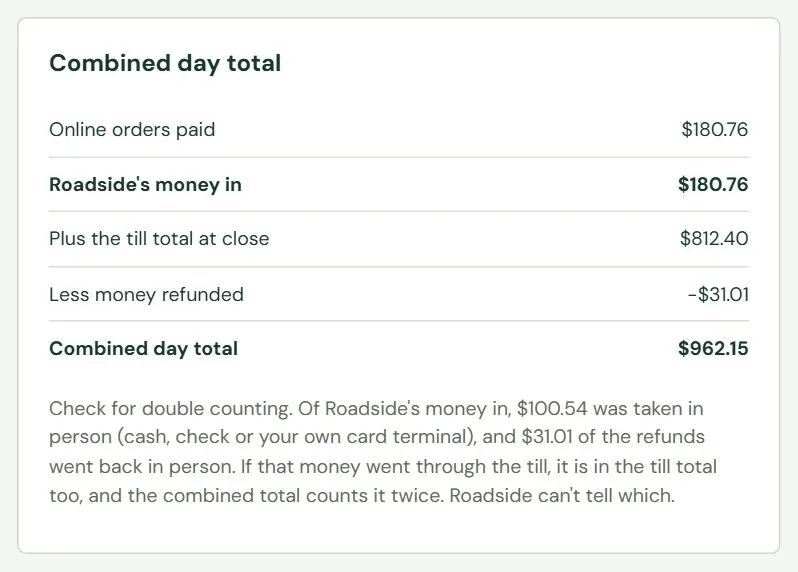
- 1Roadside's money in: what Roadside recorded as taken.
- 2Plus the till total at close: the figure a manager typed.
- 3Less money refunded.
- 4Combined day total: the three put together.
- 5The note about money that may be counted twice.
| Line | What it is |
|---|---|
| Online orders paid | The Money taken figure from that card. |
| Other money Roadside took | On a day that has some. |
| Returned checks, reversals and returned-check fees | On a day that has some, the Net from that card. |
| Roadside's money in | The lines above, added up. |
| Plus the till total at close | The till total. It reads (not entered) and adds nothing until someone saves one. |
| Less money refunded | The Money refunded figure from the Refunds card. |
| Combined day total | Money in, plus the till, less refunds. |
The same money can be on two lines. A customer who pays cash for an online order at pickup is recorded on the order, so the cash is in Roadside's money in. If that cash also went into the till, it is in the till total as well. On such a day the card says so under the total, with the amounts:
Check for double counting. Of Roadside's money in, $42.79 was taken in person (cash, check or your own card terminal). If that money went through the till, it is in the till total too, and the combined total counts it twice. Roadside can't tell which.
- Read the note under Combined day total. It names what was taken in person and, when there were any, the refunds that went back in person.
- Ask whether that money went through the till. Only your store knows where the cash, the checks and the card slips from pickup orders were put.
- If it did, correct the figure you carry to your books. The combined total is too high by the amount taken in person. A refund handed back out of the till works the other way: the till is lower by it and Less money refunded takes it off again.
On a day when nothing was taken or given back in person, the note reads Nothing Roadside recorded this day was taken or given back in person, so none of it should be in the till as well.
Download a day's figures
Included on the Online Store plan.
The download holds the same figures as the page, one line to a row, in nearly the same words. The file reads All placed, All picked up and All shipped or delivered where the page reads All. Use it to keep a day on file or to send it to whoever keeps your books.
- CSV
- A plain spreadsheet file (comma-separated values) that you can open in a spreadsheet program.
- Open Today's totals on the day you want.
- Enter the till total first if the file should include it. Without one, the file's till row reads Not entered.
- Press Download these figures (CSV). The file is named for the day, such as
day-totals-2026-11-27.csv. - Open it in a spreadsheet program.
| Column | What it holds |
|---|---|
| Date | The day, the same on every row. |
| Section | The card the row comes from, such as Online orders paid or Refunds. |
| Line | The row's label on that card, such as Cash or Money taken. |
| Count | How many orders or refunds, where the page gives a count. |
| Amount | Dollars and cents. Money refunded is a negative amount. |
The last two rows, in the section Note, give the money taken in person and the money refunded in person, for the check described in Check the combined total for money counted twice, in Chapter 29. Roadside records each download in the Audit log.
Something here does not match your screen? Write to support@dirtroadsoftware.com with the name of the screen, what you pressed and what you expected. A picture of the screen helps.